
Documentation for SSLCOMMERZ
In this section you'll find basic information about SSLCOMMERZ and how to install it and use it properly. If you're first time user then you should read Getting Started section first.
Overview
Documentation ( Version: 4.00 )
Updated: May 12th, 2019
Checkpoint Tips:
- For registration in Sandbox, click the link https://sandbox-gw.sslcommerz.com/register
- For registration in Production, click the link https://signup.sslcommerz.com/register
- There are two processes of integration:
- SSLCOMMERZ Easy Checkout in your checkout page
- Redirect the customer from your checkout page to SSLCOMMERZ Hosted page
- You will use three APIs of SSLCOMMERZ to complete the integration:
- Create and Get Session
- Receive Payment Notification (IPN)
- Order Validation API
- You must validate your transaction and amount by calling our Order Validation API
- You must develop the IPN url to receive the payment notification
- Sometime you will get Risk payments (In response you will get risk properties, value will be 0 for safe, 1 for risky). It depends on you to provide the service or not
Notification! We accept only TLS 1.2 or upper version
- To Test: You can run the below command from your server host in command line
- Command:
root@server# curl "https://sandbox.sslcommerz.com/public/tls/" -v - Output: TLS is okay
- Remarks: If you get the output as "TLS is okay", then your server supports updated TLS
SSLCOMMERZ is the first payment gateway in Bangladesh opening doors for merchants to receive payments on the internet via their online stores. Customers are able to buy products online using their credit cards as well as bank accounts. If you are a merchant, you have come to the right place! Enhance your business by integrating SSLCOMMERZ to your online store and facilitating online payment in Bangladeshi Taka. Your customers will be able to pay for your products using local credit/debit cards like VISA, MasterCard, DBBL Nexus Card and any kind of credit card or bank accounts right from your online store. SSLCOMMERZ uses industry standard Secure Sockets Layer (SSL) technology which is used worldwide for securing data encryption.
There are two ways to display the SSLCOMMERZ payment page for your customer.
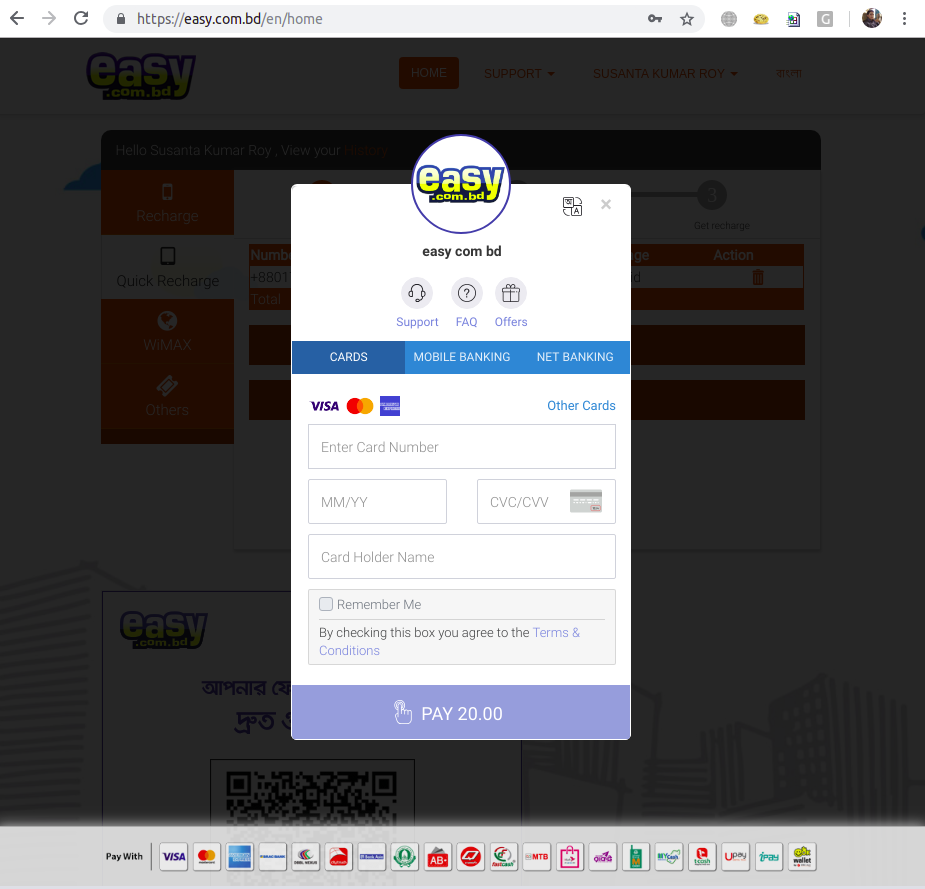
1. Easy Checkout Integration
It is an embedded js integration within your site which will display the payment channels in your page.
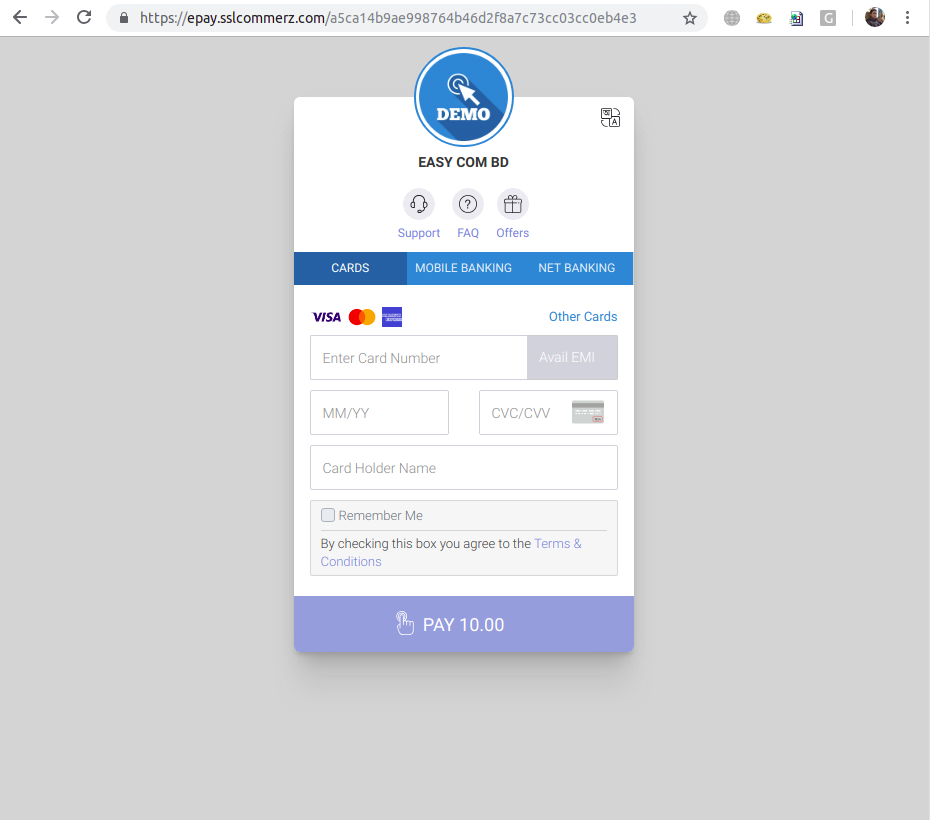
2. Hosted Payment Integration
Here, you will redirect the customer to SSLCOMMERZ Hosted page to display the payment channels
Technical or Backend Integration Process
For both Easy Checkout or Hosted Payment Integration, the backend API communication will be executed in similar way. Due to the security issue and to avoid data tampering, you must call the SSLCOMMERZ APIs from your server.
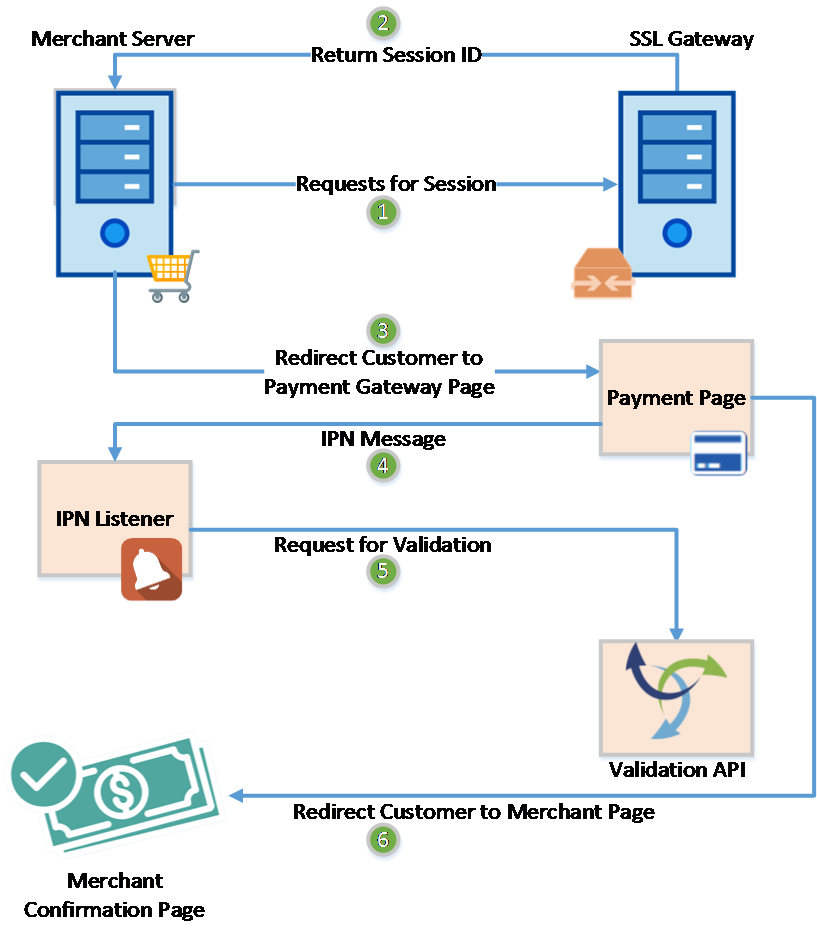
The above steps can be categorized in three sections based on the development process described below.
Transaction Initiate:
The Steps 1, 2 and 3 are used to make the request for a new transaction. After getting confirmation of checkout from customer, merchant server sends a request to SSLCOMMERZ server to get a Session ID. If all the credentials and mandatory fields are valid, then SSLCOMMERZ provides a Session ID to Merchant System. After receiving the Session ID, Merchant System redirects the customer to payment page with Session ID.
Handling Payment Notification:
The Step 4 and 5 are processed at this stage. For any notification, SSLCOMMERZ will send HTTP message in POST method called IPN Message to the Listener which is to be configured by the Merchant at their SSLCOMMERZ Administrator Panel. After receiving the message, you must validate the message with Transaction Validation API of SSLCOMMERZ.
Service Confirmation:
At Step 5, SSLCOMMERZ will redirect the customer to merchant’s side. At this stage, Merchant will display the notification of Service Confirmation.
Payment Process Environment
We have both Live environment and Test/Sandbox environment in SSLCOMMERZ. You just need to use proper URL and Store ID's to process payments. We provide separate store ID for live and test
Live Environment
All the transaction made using this environment are counted as real transaction, URL starts with https://securepay.sslcommerz.com
Sandbox Environment
All the transaction made using this environment are counted as test transaction and has no effect with accounting, URL starts with https://sandbox.sslcommerz.com.
Test Credit Card Account Numbers
| Card | Number | Expiry | CVV |
|---|---|---|---|
| VISA | 4111111111111111 | 12/26 | 111 |
| Mastercard | 5111111111111111 | 12/26 | 111 |
| American Express | 371111111111111 | 12/26 | 111 |
Mobile OTP: 111111 or 123456
Initiate Payment
For initiating payment processing, at first you need to enable HTTP IPN Listener to listen the payments. So that you can update your database accordingly even customer got connectivity issue to return back to your website.
Ready the Parameters
Some mandatory parameters need to pass to SSLCOMMERZ. It identify your customers and orders. Also you have to pass the success, fail, cancel url to redirect your customer after pay.
Sandbox / Test Environment
https://sandbox.sslcommerz.com/gwprocess/v4/api.php
Live Environment
https://securepay.sslcommerz.com/gwprocess/v4/api.php
Method: POST
Request Parameters
| Parameter | Type | Required | Description |
|---|---|---|---|
| Integration Required Parameters | |||
| store_id | string (30) | mandatory | Mandatory - Your SSLCOMMERZ Store ID is the integration credential which can be collected through our managers |
| store_passwd | string (30) | mandatory | Mandatory - Your SSLCOMMERZ Store Password is the integration credential which can be collected through our managers |
| total_amount | decimal (10,2) | mandatory | Mandatory - The amount which will process by SSLCOMMERZ. It shall be decimal value (10,2). Example : 55.40. The transaction amount must be from 10.00 BDT to 500000.00 BDT |
| currency | string (3) | mandatory | Mandatory - The currency type must be mentioned. It shall be three characters. Example : BDT, USD, EUR, SGD, INR, MYR, etc. If the transaction currency is not BDT, then it will be converted to BDT based on the current convert rate. Example : 1 USD = 82.22 BDT. |
| tran_id | string (30) | mandatory | Mandatory - Unique transaction ID to identify your order in both your end and SSLCOMMERZ |
| product_category | string (50) | mandatory | Mandatory - Mention the product category. It is an open field. Example - clothing,shoes,watches,gift,healthcare, jewellery,top up,toys,baby care,pants,laptop,donation,etc |
| success_url | string (255) | mandatory | Mandatory - It is the callback URL of your website where user will redirect after successful payment (Length: 255) |
| fail_url | string (255) | mandatory | Mandatory - It is the callback URL of your website where user will redirect after any failure occur during payment (Length: 255) |
| cancel_url | string (255) | mandatory | Mandatory - It is the callback URL of your website where user will redirect if user canceled the transaction (Length: 255) |
| ipn_url | string (255) | optional | Important! Not mandatory, however better to use to avoid missing any payment notification - It is the Instant Payment Notification (IPN) URL of your website where SSLCOMMERZ will send the transaction's status (Length: 255). The data will be communicated as SSLCOMMERZ Server to your Server. So, customer session will not work. IPN is very important feature to integrate with your site(s). Some transaction could be pending or customer lost his/her session, in such cases back-end IPN plays a very important role to update your backend office. |
| multi_card_name | string (30) | optional | Do not Use! If you do not customize the gateway list - You can control to display the gateway list at SSLCOMMERZ gateway selection page by providing this parameters.
GROUP GATEWAY
|
| allowed_bin | string (255) | optional | Do not Use! If you do not control on transaction - You can provide the BIN of card to allow the transaction must be completed by this BIN. You can declare by comma ',' separate of these BIN. Example: 371598,371599,376947,376948,376949 |
| Parameters to Handle EMI Transaction | |||
| emi_option | integer (1) | mandatory | Mandatory - This is mandatory if transaction is EMI enabled and Value must be 1/0. Here, 1 means customer will get EMI facility for this transaction |
| emi_max_inst_option | integer (2) | optional | Max instalment Option, Here customer will get 3,6, 9 instalment at gateway page |
| emi_selected_inst | integer (2) | optional | Customer has selected from your Site, So no instalment option will be displayed at gateway page |
| emi_allow_only | integer (1) | optional | Value is 1/0, if value is 1 then only EMI transaction is possible, in payment page. No Mobile banking and internet banking channel will not display. This parameter depends on emi_option and emi_selected_inst |
| Customer Information | |||
| cus_name | string (50) | mandatory | Mandatory - Your customer name to address the customer in payment receipt email |
| cus_email | string (50) | mandatory | Mandatory - Valid email address of your customer to send payment receipt from SSLCOMMERZ end |
| cus_add1 | string (50) | mandatory | Mandatory - Address of your customer. Not mandatory but useful if provided |
| cus_add2 | string (50) | optional | Address line 2 of your customer. Not mandatory but useful if provided |
| cus_city | string (50) | mandatory | Mandatory - City of your customer. Not mandatory but useful if provided |
| cus_state | string (50) | optional | State of your customer. Not mandatory but useful if provided |
| cus_postcode | string (30) | mandatory | Mandatory - Postcode of your customer. Not mandatory but useful if provided |
| cus_country | string (50) | mandatory | Mandatory - Country of your customer. Not mandatory but useful if provided |
| cus_phone | string (20) | mandatory | Mandatory - The phone/mobile number of your customer to contact if any issue arises Required For SSLCOMMERZ_LOGISTIC |
| cus_fax | string (20) | optional | Fax number of your customer. Not mandatory but useful if provided |
| Shipment Information | |||
| shipping_method | string (50) | mandatory | Mandatory - Shipping method of the order. Example: YES or NO or Courier or SSLCOMMERZ_LOGISTIC. Required For SSLCOMMERZ_LOGISTIC |
| num_of_item | integer (1) | mandatory | Mandatory - No of product will be shipped. Example: 1 or 2 or etc Required For SSLCOMMERZ_LOGISTIC |
| weight_of_items | decimal (10,2) | mandatory | Mandatory - Weight of products will be shipped. Example: 0.5 or 2.00 or etc in kg Required For SSLCOMMERZ_LOGISTIC |
| logistic_pickup_id | string (50) | mandatory | Mandatory - This is a id from where the SSLCOMMERZ logistic partners will come to receive your product for shipment. You will set and get this pickup information from your merchant portal provided by SSLCOMMERZ. Required For SSLCOMMERZ_LOGISTIC |
| logistic_delivery_type | string (50) | mandatory | Mandatory - This information is required by SSLCOMMERZ logistic partners before receiving your product for shipment. Required For SSLCOMMERZ_LOGISTIC |
| ship_name | string (50) | conditional | Mandatory, if shipping_method is YES - Shipping Address of your order. Not mandatory but useful if provided Required For SSLCOMMERZ_LOGISTIC |
| ship_add1 | string (50) | conditional | Mandatory, if shipping_method is YES - Additional Shipping Address of your order. Not mandatory but useful if provided Required For SSLCOMMERZ_LOGISTIC |
| ship_add2 | string (50) | optional | Additional Shipping Address of your order. Not mandatory but useful if provided Required For SSLCOMMERZ_LOGISTIC |
| ship_area | string (50) | conditional | Mandatory, if shipping_method is YES - Shipping area of your order. Not mandatory but useful if provided Required For SSLCOMMERZ_LOGISTIC |
| ship_city | string (50) | conditional | Mandatory, if shipping_method is YES - Shipping city of your order. Not mandatory but useful if provided Required For SSLCOMMERZ_LOGISTIC |
| ship_sub_city | string (50) | conditional | Mandatory, if shipping_method is YES - Shipping sub city or sub-district or thana of your order. Not mandatory but useful if provided Required For SSLCOMMERZ_LOGISTIC |
| ship_state | string (50) | optional | Shipping state of your order. Not mandatory but useful if provided |
| ship_postcode | string (50) | conditional | Mandatory, if shipping_method is YES - Shipping postcode of your order. Not mandatory but useful if provided Required For SSLCOMMERZ_LOGISTIC |
| ship_country | string (50) | conditional | Mandatory, if shipping_method is YES - Shipping country of your order. Not mandatory but useful if provided |
| Product Information | |||
| product_name | string (255) | mandatory | Mandatory - Mention the product name briefly. Mention the product name by comma separate. Example: Computer,Speaker |
| product_category | string (100) | mandatory | Mandatory - Mention the product category. Example: Electronic or topup or bus ticket or air ticket |
| product_profile | string (100) | mandatory | Mandatory - Mention goods vertical. It is very much necessary for online transactions to avoid chargeback. Please use the below keys:
|
| hours_till_departure | string (30) | conditional | Mandatory, if product_profile is airline-tickets - Provide the remaining time of departure of flight till at the time of purchasing the ticket. Example: 12 hrs or 36 hrs |
| flight_type | string (30) | conditional | Mandatory, if product_profile is airline-tickets - Provide the flight type. Example: Oneway or Return or Multistop |
| pnr | string (50) | conditional | Mandatory, if product_profile is airline-tickets - Provide the PNR. |
| journey_from_to | string (255) | conditional | Mandatory, if product_profile is airline-tickets - Provide the journey route. Example: DAC-CGP or DAC-CGP CGP-DAC |
| third_party_booking | string (20) | conditional | Mandatory, if product_profile is airline-tickets - No/Yes. Whether the ticket has been taken from third party booking system. |
| hotel_name | string (255) | conditional | Mandatory, if product_profile is travel-vertical - Please provide the hotel name. Example: Sheraton |
| length_of_stay | string (30) | conditional | Mandatory, if product_profile is travel-vertical - How long stay in hotel. Example: 2 days |
| check_in_time | string (30) | conditional | Mandatory, if product_profile is travel-vertical - Checking hours for the hotel room. Example: 24 hrs |
| hotel_city | string (50) | conditional | Mandatory, if product_profile is travel-vertical - Location of the hotel. Example: Dhaka |
| product_type | string (30) | conditional | Mandatory, if product_profile is telecom-vertical - For mobile or any recharge, this information is necessary. Example: Prepaid or Postpaid |
| topup_number | string (150) | conditional | Mandatory, if product_profile is telecom-vertical - Provide the mobile number which will be recharged. Example: 8801700000000 or 8801700000000,8801900000000 |
| country_topup | string (30) | conditional | Mandatory, if product_profile is telecom-vertical - Provide the country name in where the service is given. Example: Bangladesh |
| cart | json | optional | JSON data with two elements. product : Max 255 characters, quantity : Quantity in numeric value and amount : Decimal (12,2) Example: [{"sku":"REF00001","product":"DHK TO BRS AC A1","quantity":"1","amount":"200.00","unit_price":"200.00"},{"sku":"REF00002","product":"DHK TO BRS AC A2","quantity":"1","amount":"200.00","unit_price":"200.00"},{"sku":"REF00003","product":"DHK TO BRS AC A3","quantity":"1","amount":"200.00","unit_price":"200.00"},{"sku":"REF00004","product":"DHK TO BRS AC A4","quantity":"2","amount":"200.00","unit_price":"100.00"}] Required For SSLCOMMERZ_LOGISTIC |
| product_amount | decimal (10,2) | optional | Product price which will be displayed in your merchant panel and will help you to reconcile the transaction. It shall be decimal value (10,2). Example : 50.40 |
| vat | decimal (10,2) | optional | The VAT included on the product price which will be displayed in your merchant panel and will help you to reconcile the transaction. It shall be decimal value (10,2). Example : 4.00 |
| discount_amount | decimal (10,2) | optional | Discount given on the invoice which will be displayed in your merchant panel and will help you to reconcile the transaction. It shall be decimal value (10,2). Example : 2.00 |
| convenience_fee | decimal (10,2) | optional | Any convenience fee imposed on the invoice which will be displayed in your merchant panel and will help you to reconcile the transaction. It shall be decimal value (10,2). Example : 3.00 |
| Customized or Additional Parameters | |||
| value_a | string (255) | optional | Extra parameter to pass your meta data if it is needed. Not mandatory |
| value_b | string (255) | optional | Extra parameter to pass your meta data if it is needed. Not mandatory |
| value_c | string (255) | optional | Extra parameter to pass your meta data if it is needed. Not mandatory |
| value_d | string (255) | optional | Extra parameter to pass your meta data if it is needed. Not mandatory |
Returned Parameters
| Param Name | Data Type | Description |
|---|---|---|
| status | string (10) | API connectivity status. If all the required data is provided, then it will return as SUCCESS, neither it will be FAILED |
| failedreason | string (255) | If API connectivity is failed then it returns the reason. |
| sessionkey | string (50) | A unique session key which must be saved at your system to query the transaction status any time (if required). |
| gw | string | It will list all active gateways. If you add this key with the parameter of redirectGatewayURL, then it will be redirected to that gateway directly. All these gateway keys are classified into six major categories. Such as visa, master, amex, othercards, internetbanking and mobilebanking. |
| GatewayPageURL | string (255) | The URL to where you will redirect the customer to pay. This is the main URL which you will use for the integration. |
| storeBanner | string (255) | It will return the image URL if any banner is uploaded against the store. |
| storeLogo | string (255) | It will return the image URL if any logo is uploaded against the store. |
| desc | string | All gateways' brief description. If you want to know about the individual gateway key, then this parameter will help you. Example: search visacard in the element gw of this parameter, then you will get the gateway name, type and logo. |
CREATE and GET Session
Make an array by using those parameters fill with data, You need to create session at SSLCOMMERZ end. You have to call initiation API to generate session and get in response
POST gwprocess/v4/api.php

Request Example

$ curl -X POST https://sandbox.sslcommerz.com/gwprocess/v4/api.php
-d
'store_id=testbox&
store_passwd=qwerty&
total_amount=100&
currency=EUR&
tran_id=REF123&
success_url=http://yoursite.com/success.php&
fail_url=http://yoursite.com/fail.php&
cancel_url=http://yoursite.com/cancel.php&
cus_name=Customer Name&
cus_email=cust@yahoo.com&
cus_add1=Dhaka&
cus_add2=Dhaka&
cus_city=Dhaka&
cus_state=Dhaka&
cus_postcode=1000&
cus_country=Bangladesh&
cus_phone=01711111111&
cus_fax=01711111111&
ship_name=Customer Name&
ship_add1=Dhaka&
ship_add2=Dhaka&
ship_city=Dhaka&
ship_state=Dhaka&
ship_postcode=1000&
ship_country=Bangladesh&
multi_card_name=mastercard,visacard,amexcard&
value_a=ref001_A&
value_b=ref002_B&
value_c=ref003_C&
value_d=ref004_D'

Response Example
{
   "status":"SUCCESS",
   "failedreason":"",
   "sessionkey":"F298BC45B0688E02768900C4F6B28C8B",
   "gw":{
      "visa":"dbbl_visa,brac_visa,city_visa,ebl_visa,visacard",
      "master":"dbbl_master,brac_master,city_master,ebl_master,mastercard",
      "amex":"city_amex,amexcard",
      "othercards":"dbbl_nexus,qcash,fastcash",
      "internetbanking":"city,bankasia,ibbl,mtbl",
      "mobilebanking":"dbblmobilebanking,bkash,abbank,ibbl"
   },
   "redirectGatewayURL":"https:\/\/sandbox.sslcommerz.com\/gwprocess\/v4\/bankgw\/indexhtml.php?mamount=10228.84&ssl_id=19021022820J3Tctm708jSQiZU&Q=REDIRECT&SESSIONKEY=F298BC45B0688E02768900C4F6B28C8B&tran_type=success&cardname=",
   "directPaymentURLBank":"https:\/\/sandbox.sslcommerz.com\/gwprocess\/v4\/bankgw\/indexhtmlOTP.php?mamount=10228.84&ssl_id=19021022820J3Tctm708jSQiZU&Q=REDIRECT&SESSIONKEY=F298BC45B0688E02768900C4F6B28C8B&tran_type=success&cardname=visavard",
   "directPaymentURLCard":"",
   "directPaymentURL":"",
   "redirectGatewayURLFailed":"",
   "GatewayPageURL":"https:\/\/sandbox.sslcommerz.com\/gwprocess\/v4\/gw.php?Q=PAY&SESSIONKEY=F298BC45B0688E02768900C4F6B28C8B",
   "storeBanner":"https:\/\/securepay.sslcommerz.com\/testbox\/stores\/banners\/easyv1.png?v=5c5f37e4c6ee6",
   "storeLogo":"https:\/\/securepay.sslcommerz.com\/testbox\/stores\/logos\/logo_SCZ100197.jpg?v=5c5f37e4c6f30",
   "desc":[
      {
         "name":"AMEX",
         "type":"amex",
         "logo":"https:\/\/sandbox.sslcommerz.com\/gwprocess\/v4\/image\/gw\/amex.png",
         "gw":"amexcard",
         "r_flag":"1",
         "redirectGatewayURL":"https:\/\/sandbox.sslcommerz.com\/gwprocess\/v4\/bankgw\/indexhtmlOTP.php?mamount=10228.84&ssl_id=19021022820J3Tctm708jSQiZU&Q=REDIRECT&SESSIONKEY=F298BC45B0688E02768900C4F6B28C8B&tran_type=success&cardname=amexcard"
      },
      {
         "name":"VISA",
         "type":"visa",
         "logo":"https:\/\/sandbox.sslcommerz.com\/gwprocess\/v4\/image\/gw\/visa.png",
         "gw":"visacard",
         "r_flag":"1",
         "redirectGatewayURL":"https:\/\/sandbox.sslcommerz.com\/gwprocess\/v4\/bankgw\/indexhtmlOTP.php?mamount=10228.84&ssl_id=19021022820J3Tctm708jSQiZU&Q=REDIRECT&SESSIONKEY=F298BC45B0688E02768900C4F6B28C8B&tran_type=success&cardname=visavard"
      },
      {
         "name":"MASTER",
         "type":"master",
         "logo":"https:\/\/sandbox.sslcommerz.com\/gwprocess\/v4\/image\/gw\/master.png",
         "gw":"mastercard",
         "r_flag":"1",
         "redirectGatewayURL":"https:\/\/sandbox.sslcommerz.com\/gwprocess\/v4\/bankgw\/indexhtmlOTP.php?mamount=10228.84&ssl_id=19021022820J3Tctm708jSQiZU&Q=REDIRECT&SESSIONKEY=F298BC45B0688E02768900C4F6B28C8B&tran_type=success&cardname=mastercard"
      },
      {
         "name":"AMEX-City Bank",
         "type":"amex",
         "logo":"https:\/\/sandbox.sslcommerz.com\/gwprocess\/v4\/image\/gw\/amex.png",
         "gw":"city_amex",
         "r_flag":"1",
         "redirectGatewayURL":"https:\/\/sandbox.sslcommerz.com\/gwprocess\/v4\/bankgw\/indexhtmlOTP.php?mamount=10228.84&ssl_id=19021022820J3Tctm708jSQiZU&Q=REDIRECT&SESSIONKEY=F298BC45B0688E02768900C4F6B28C8B&tran_type=success&cardname=city_amex"
      },
      {
         "name":"NEXUS",
         "type":"othercards",
         "logo":"https:\/\/sandbox.sslcommerz.com\/gwprocess\/v4\/image\/gw\/dbblnexus.png",
         "gw":"dbbl_nexus",
         "r_flag":"1",
         "redirectGatewayURL":"https:\/\/sandbox.sslcommerz.com\/gwprocess\/v4\/bankgw\/indexhtmlOTP.php?mamount=10228.84&ssl_id=19021022820J3Tctm708jSQiZU&Q=REDIRECT&SESSIONKEY=F298BC45B0688E02768900C4F6B28C8B&tran_type=success&cardname=dbbl_nexus"
      },
      {
         "name":"QCash",
         "type":"othercards",
         "logo":"https:\/\/sandbox.sslcommerz.com\/gwprocess\/v4\/image\/gw\/qcash.png",
         "gw":"qcash",
         "r_flag":"1",
         "redirectGatewayURL":"https:\/\/sandbox.sslcommerz.com\/gwprocess\/v4\/bankgw\/indexhtmlOTP.php?mamount=10228.84&ssl_id=19021022820J3Tctm708jSQiZU&Q=REDIRECT&SESSIONKEY=F298BC45B0688E02768900C4F6B28C8B&tran_type=success&cardname=qcash"
      },
      {
         "name":"Fast Cash",
         "type":"othercards",
         "logo":"https:\/\/sandbox.sslcommerz.com\/gwprocess\/v4\/image\/gw\/fastcash.png",
         "gw":"fastcash"
      },
      {
         "name":"BKash",
         "type":"mobilebanking",
         "logo":"https:\/\/sandbox.sslcommerz.com\/gwprocess\/v4\/image\/gw\/bkash.png",
         "gw":"bkash",
         "r_flag":"1",
         "redirectGatewayURL":"https:\/\/sandbox.sslcommerz.com\/gwprocess\/v4\/bankgw\/indexhtmlOTP.php?mamount=10228.84&ssl_id=19021022820J3Tctm708jSQiZU&Q=REDIRECT&SESSIONKEY=F298BC45B0688E02768900C4F6B28C8B&tran_type=success&cardname=bkash"
      },
      {
         "name":"DBBL Mobile Banking",
         "type":"mobilebanking",
         "logo":"https:\/\/sandbox.sslcommerz.com\/gwprocess\/v4\/image\/gw\/dbblmobilebank.png",
         "gw":"dbblmobilebanking",
         "r_flag":"1",
         "redirectGatewayURL":"https:\/\/sandbox.sslcommerz.com\/gwprocess\/v4\/bankgw\/indexhtmlOTP.php?mamount=10228.84&ssl_id=19021022820J3Tctm708jSQiZU&Q=REDIRECT&SESSIONKEY=F298BC45B0688E02768900C4F6B28C8B&tran_type=success&cardname=dbblmobilebanking"
      },
      {
         "name":"AB Direct",
         "type":"mobilebanking",
         "logo":"https:\/\/sandbox.sslcommerz.com\/gwprocess\/v4\/image\/gw\/abbank.png",
         "gw":"abbank",
         "r_flag":"1",
         "redirectGatewayURL":"https:\/\/sandbox.sslcommerz.com\/gwprocess\/v4\/bankgw\/indexhtmlOTP.php?mamount=10228.84&ssl_id=19021022820J3Tctm708jSQiZU&Q=REDIRECT&SESSIONKEY=F298BC45B0688E02768900C4F6B28C8B&tran_type=success&cardname=abbank"
      },
      {
         "name":"IBBL",
         "type":"internetbanking",
         "logo":"https:\/\/sandbox.sslcommerz.com\/gwprocess\/v4\/image\/gw\/ibbl.png",
         "gw":"ibbl",
         "r_flag":"1",
         "redirectGatewayURL":"https:\/\/sandbox.sslcommerz.com\/gwprocess\/v4\/bankgw\/indexhtmlOTP.php?mamount=10228.84&ssl_id=19021022820J3Tctm708jSQiZU&Q=REDIRECT&SESSIONKEY=F298BC45B0688E02768900C4F6B28C8B&tran_type=success&cardname=ibbl"
      },
      {
         "name":"Citytouch",
         "type":"internetbanking",
         "logo":"https:\/\/sandbox.sslcommerz.com\/gwprocess\/v4\/image\/gw\/citytouch.png",
         "gw":"city",
         "r_flag":"1",
         "redirectGatewayURL":"https:\/\/sandbox.sslcommerz.com\/gwprocess\/v4\/bankgw\/indexhtmlOTP.php?mamount=10228.84&ssl_id=19021022820J3Tctm708jSQiZU&Q=REDIRECT&SESSIONKEY=F298BC45B0688E02768900C4F6B28C8B&tran_type=success&cardname=city"
      },
      {
         "name":"MTBL",
         "type":"internetbanking",
         "logo":"https:\/\/sandbox.sslcommerz.com\/gwprocess\/v4\/image\/gw\/mtbl.png",
         "gw":"mtbl",
         "r_flag":"1",
         "redirectGatewayURL":"https:\/\/sandbox.sslcommerz.com\/gwprocess\/v4\/bankgw\/indexhtmlOTP.php?mamount=10228.84&ssl_id=19021022820J3Tctm708jSQiZU&Q=REDIRECT&SESSIONKEY=F298BC45B0688E02768900C4F6B28C8B&tran_type=success&cardname=mtbl"
      },
      {
         "name":"Bank Asia",
         "type":"internetbanking",
         "logo":"https:\/\/sandbox.sslcommerz.com\/gwprocess\/v4\/image\/gw\/bankasia.png",
         "gw":"bankasia",
         "r_flag":"1",
         "redirectGatewayURL":"https:\/\/sandbox.sslcommerz.com\/gwprocess\/v4\/bankgw\/indexhtmlOTP.php?mamount=10228.84&ssl_id=19021022820J3Tctm708jSQiZU&Q=REDIRECT&SESSIONKEY=F298BC45B0688E02768900C4F6B28C8B&tran_type=success&cardname=bankasia"
      },
      {
         "name":"VISA-Eastern Bank Limited",
         "type":"visa",
         "logo":"https:\/\/sandbox.sslcommerz.com\/gwprocess\/v4\/image\/gw\/visa.png",
         "gw":"ebl_visa",
         "r_flag":"1",
         "redirectGatewayURL":"https:\/\/sandbox.sslcommerz.com\/gwprocess\/v4\/bankgw\/indexhtmlOTP.php?mamount=10228.84&ssl_id=19021022820J3Tctm708jSQiZU&Q=REDIRECT&SESSIONKEY=F298BC45B0688E02768900C4F6B28C8B&tran_type=success&cardname=ebl_visa"
      },
      {
         "name":"MASTER-Eastern Bank Limited",
         "type":"master",
         "logo":"https:\/\/sandbox.sslcommerz.com\/gwprocess\/v4\/image\/gw\/master.png",
         "gw":"ebl_master",
         "r_flag":"1",
         "redirectGatewayURL":"https:\/\/sandbox.sslcommerz.com\/gwprocess\/v4\/bankgw\/indexhtmlOTP.php?mamount=10228.84&ssl_id=19021022820J3Tctm708jSQiZU&Q=REDIRECT&SESSIONKEY=F298BC45B0688E02768900C4F6B28C8B&tran_type=success&cardname=ebl_master"
      },
      {
         "name":"VISA-City Bank",
         "type":"visa",
         "logo":"https:\/\/sandbox.sslcommerz.com\/gwprocess\/v4\/image\/gw\/visa.png",
         "gw":"city_visa",
         "r_flag":"1",
         "redirectGatewayURL":"https:\/\/sandbox.sslcommerz.com\/gwprocess\/v4\/bankgw\/indexhtmlOTP.php?mamount=10228.84&ssl_id=19021022820J3Tctm708jSQiZU&Q=REDIRECT&SESSIONKEY=F298BC45B0688E02768900C4F6B28C8B&tran_type=success&cardname=city_visa"
      },
      {
         "name":"MASTER-City bank",
         "type":"master",
         "logo":"https:\/\/sandbox.sslcommerz.com\/gwprocess\/v4\/image\/gw\/master.png",
         "gw":"city_master",
         "r_flag":"1",
         "redirectGatewayURL":"https:\/\/sandbox.sslcommerz.com\/gwprocess\/v4\/bankgw\/indexhtmlOTP.php?mamount=10228.84&ssl_id=19021022820J3Tctm708jSQiZU&Q=REDIRECT&SESSIONKEY=F298BC45B0688E02768900C4F6B28C8B&tran_type=success&cardname=city_master"
      },
      {
         "name":"VISA-Brac bank",
         "type":"visa",
         "logo":"https:\/\/sandbox.sslcommerz.com\/gwprocess\/v4\/image\/gw\/visa.png",
         "gw":"brac_visa",
         "r_flag":"1",
         "redirectGatewayURL":"https:\/\/sandbox.sslcommerz.com\/gwprocess\/v4\/bankgw\/indexhtmlOTP.php?mamount=10228.84&ssl_id=19021022820J3Tctm708jSQiZU&Q=REDIRECT&SESSIONKEY=F298BC45B0688E02768900C4F6B28C8B&tran_type=success&cardname=brac_visa"
      },
      {
         "name":"MASTER-Brac bank",
         "type":"master",
         "logo":"https:\/\/sandbox.sslcommerz.com\/gwprocess\/v4\/image\/gw\/master.png",
         "gw":"brac_master",
         "r_flag":"1",
         "redirectGatewayURL":"https:\/\/sandbox.sslcommerz.com\/gwprocess\/v4\/bankgw\/indexhtmlOTP.php?mamount=10228.84&ssl_id=19021022820J3Tctm708jSQiZU&Q=REDIRECT&SESSIONKEY=F298BC45B0688E02768900C4F6B28C8B&tran_type=success&cardname=brac_master"
      },
      {
         "name":"VISA-Dutch bank",
         "type":"visa",
         "logo":"https:\/\/sandbox.sslcommerz.com\/gwprocess\/v4\/image\/gw\/visa.png",
         "gw":"dbbl_visa",
         "r_flag":"1",
         "redirectGatewayURL":"https:\/\/sandbox.sslcommerz.com\/gwprocess\/v4\/bankgw\/indexhtmlOTP.php?mamount=10228.84&ssl_id=19021022820J3Tctm708jSQiZU&Q=REDIRECT&SESSIONKEY=F298BC45B0688E02768900C4F6B28C8B&tran_type=success&cardname=dbbl_visa"
      },
      {
         "name":"MASTER-Dutch Bangla",
         "type":"master",
         "logo":"https:\/\/sandbox.sslcommerz.com\/gwprocess\/v4\/image\/gw\/master.png",
         "gw":"dbbl_master",
         "r_flag":"1",
         "redirectGatewayURL":"https:\/\/sandbox.sslcommerz.com\/gwprocess\/v4\/bankgw\/indexhtmlOTP.php?mamount=10228.84&ssl_id=19021022820J3Tctm708jSQiZU&Q=REDIRECT&SESSIONKEY=F298BC45B0688E02768900C4F6B28C8B&tran_type=success&cardname=dbbl_master"
      }
   ],
   "is_direct_pay_enable":"1"
}/* PHP */
$post_data = array();
$post_data['store_id'] = "testbox";
$post_data['store_passwd'] = "qwerty";
$post_data['total_amount'] = "103";
$post_data['currency'] = "BDT";
$post_data['tran_id'] = "SSLCZ_TEST_".uniqid();
$post_data['success_url'] = "http://localhost/new_sslcz_gw/success.php";
$post_data['fail_url'] = "http://localhost/new_sslcz_gw/fail.php";
$post_data['cancel_url'] = "http://localhost/new_sslcz_gw/cancel.php";
# $post_data['multi_card_name'] = "mastercard,visacard,amexcard"; # DISABLE TO DISPLAY ALL AVAILABLE
# EMI INFO
$post_data['emi_option'] = "1";
$post_data['emi_max_inst_option'] = "9";
$post_data['emi_selected_inst'] = "9";
# CUSTOMER INFORMATION
$post_data['cus_name'] = "Test Customer";
$post_data['cus_email'] = "test@test.com";
$post_data['cus_add1'] = "Dhaka";
$post_data['cus_add2'] = "Dhaka";
$post_data['cus_city'] = "Dhaka";
$post_data['cus_state'] = "Dhaka";
$post_data['cus_postcode'] = "1000";
$post_data['cus_country'] = "Bangladesh";
$post_data['cus_phone'] = "01711111111";
$post_data['cus_fax'] = "01711111111";
# SHIPMENT INFORMATION
$post_data['ship_name'] = "Store Test";
$post_data['ship_add1'] = "Dhaka";
$post_data['ship_add2'] = "Dhaka";
$post_data['ship_city'] = "Dhaka";
$post_data['ship_state'] = "Dhaka";
$post_data['ship_postcode'] = "1000";
$post_data['ship_country'] = "Bangladesh";
# OPTIONAL PARAMETERS
$post_data['value_a'] = "ref001";
$post_data['value_b'] = "ref002";
$post_data['value_c'] = "ref003";
$post_data['value_d'] = "ref004";
# CART PARAMETERS
$post_data['cart'] = json_encode(array(
array("product"=>"DHK TO BRS AC A1","amount"=>"200.00"),
array("product"=>"DHK TO BRS AC A2","amount"=>"200.00"),
array("product"=>"DHK TO BRS AC A3","amount"=>"200.00"),
array("product"=>"DHK TO BRS AC A4","amount"=>"200.00")
));
$post_data['product_amount'] = "100";
$post_data['vat'] = "5";
$post_data['discount_amount'] = "5";
$post_data['convenience_fee'] = "3";
# REQUEST SEND TO SSLCOMMERZ
$direct_api_url = "https://sandbox.sslcommerz.com/gwprocess/v4/api.php";
$handle = curl_init();
curl_setopt($handle, CURLOPT_URL, $direct_api_url );
curl_setopt($handle, CURLOPT_TIMEOUT, 30);
curl_setopt($handle, CURLOPT_CONNECTTIMEOUT, 30);
curl_setopt($handle, CURLOPT_POST, 1 );
curl_setopt($handle, CURLOPT_POSTFIELDS, $post_data);
curl_setopt($handle, CURLOPT_RETURNTRANSFER, true);
# The official sample sets this to FALSE "IF YOU RUN FROM LOCAL PC" - local testing only; never disable TLS verification in production.
curl_setopt($handle, CURLOPT_SSL_VERIFYPEER, TRUE);
$content = curl_exec($handle );
$code = curl_getinfo($handle, CURLINFO_HTTP_CODE);
if($code == 200 && !( curl_errno($handle))) {
curl_close( $handle);
$sslcommerzResponse = $content;
} else {
curl_close( $handle);
echo "FAILED TO CONNECT WITH SSLCOMMERZ API";
exit;
}
# PARSE THE JSON RESPONSE
$sslcz = json_decode($sslcommerzResponse, true );
if(isset($sslcz['GatewayPageURL']) && $sslcz['GatewayPageURL']!="" ) {
# THERE ARE MANY WAYS TO REDIRECT - Javascript, Meta Tag or Php Header Redirect or Other
# echo "<script>window.location.href = '". $sslcz['GatewayPageURL'] ."';</script>";
echo "<meta http-equiv='refresh' content='0;url=".$sslcz['GatewayPageURL']."'>";
# header("Location: ". $sslcz['GatewayPageURL']);
exit;
} else {
echo "JSON Data parsing error!";
}use Illuminate\Support\Facades\Http;
$response = Http::asForm()
->timeout(30)
->connectTimeout(30)
->post('https://sandbox.sslcommerz.com/gwprocess/v4/api.php', [
'store_id' => config('services.sslcommerz.store_id'),
'store_passwd' => config('services.sslcommerz.store_password'),
'total_amount' => '100',
'currency' => 'EUR',
'tran_id' => 'REF123',
'success_url' => 'http://yoursite.com/success.php',
'fail_url' => 'http://yoursite.com/fail.php',
'cancel_url' => 'http://yoursite.com/cancel.php',
'cus_name' => 'Customer Name',
'cus_email' => 'cust@yahoo.com',
'cus_add1' => 'Dhaka',
'cus_add2' => 'Dhaka',
'cus_city' => 'Dhaka',
'cus_state' => 'Dhaka',
'cus_postcode' => '1000',
'cus_country' => 'Bangladesh',
'cus_phone' => '01711111111',
'cus_fax' => '01711111111',
'ship_name' => 'Customer Name',
'ship_add1' => 'Dhaka',
'ship_add2' => 'Dhaka',
'ship_city' => 'Dhaka',
'ship_state' => 'Dhaka',
'ship_postcode' => '1000',
'ship_country' => 'Bangladesh',
'multi_card_name' => 'mastercard,visacard,amexcard',
'value_a' => 'ref001_A',
'value_b' => 'ref002_B',
'value_c' => 'ref003_C',
'value_d' => 'ref004_D',
]);
if ($response->failed() || $response->json('status') !== 'SUCCESS') {
abort(502, 'Unable to create SSLCOMMERZ session.');
}
// Redirect the customer to the GatewayPageURL
return redirect()->away($response->json('GatewayPageURL'));The PHP tab is the official PHP Code to Initiate the Transaction. API Endpoint (Sandbox/Test Environment): https://sandbox.sslcommerz.com/gwprocess/v4/api.php, API Endpoint (Live Environment): https://securepay.sslcommerz.com/gwprocess/v4/api.php, Method : POST ( CURL for PHP, httpwebrequest for .NET and etc).
You have to parse GatewayPageURL field from this json response and redirect user to this url.
Validate Payment with IPN
Remember, We have set an IPN URL in first step so that your server can listen at the right moment when payment is done at Bank End. So, It is important to validate the transaction notification to maintain security and standard.
Grab the Notification
As IPN URL already set in panel. All the payment notification will reach through IPN prior to user return back. So it needs validation for amount and transaction properly.
The IPN will send a POST REQUEST with below parameters. Grab the post notification with your desired platform ( PHP: $_POST)
| Param Name | Data Type | Description |
|---|---|---|
| status | string (20) | Transaction Status - as VALID / FAILED / CANCELLED / EXPIRED / UNATTEMPTED This parameter needs to be checked before update your database
|
| tran_date | datetime | Transaction date - Payment completion date as 2016-05-08 15:53:49 ( PHP date('Y-m-d H:i:s') ) |
| tran_id | string (30) | Transaction ID (Unique) that was sent by you during initiation. This parameter needs to be validated with your system database for security |
| val_id | string (50) | A Validation ID against the Transaction which is provided by SSLCOMMERZ. |
| amount | decimal (10,2) | The total amount sent by you. However, it could be changed based on currency type. This parameter needs to be validated with your system database for security |
| store_amount | decimal (10,2) | The amount what you will get in your account after bank charge ( Example: 100 BDT will be your store amount of 96 BDT after 4% Bank Commission ) |
| card_type | string (50) | The Bank Gateway Name that customer selected |
| card_no | string (80) | Customer’s Card number. However, for Mobile Banking and Internet Banking, it will return customer's reference id. |
| currency | string (3) | Currency Type which will be settled with your merchant account after deducting the Gateway charges. This parameter is the currency type of the parameter amount |
| bank_tran_id | string (80) | The transaction ID at Banks End |
| card_issuer | string (100) | Issuer Bank Name |
| card_brand | string (30) | VISA, MASTER, AMEX, IB or MOBILE BANKING |
| card_issuer_country | string (50) | Country of Card Issuer Bank |
| card_issuer_country_code | string (2) | 2 digits short code of Country of Card Issuer Bank |
| currency_type | string (3) | The currency you have sent during initiation of this transaction. If the currency is different than BDT, then it will be converted to BDT by the current conversion rate. This parameter needs to be validated with your system database for security |
| currency_amount | decimal (10,2) | The currency amount you have sent during initiation of this transaction. If the amount is not mentioned in BDT, then it will be converted to BDT by the current conversion rate and return by the above field amount. This parameter needs to be validated with your system database for security |
| value_a | string (255) | Same Value will be returned as Passed during initiation |
| value_b | string (255) | Same Value will be returned as Passed during initiation |
| value_c | string (255) | Same Value will be returned as Passed during initiation |
| value_d | string (255) | Same Value will be returned as Passed during initiation |
| verify_sign | string (255) | Data Validation Key |
| verify_key | string | Data Validation Key |
| risk_level | integer (1) | Transaction's Risk Level - High (1) for most risky transactions and Low (0) for safe transactions. Please hold the service and proceed to collect customer verification documents |
| risk_title | string (50) | Transaction's Risk Level Description |
POST <YOUR IPN LISTENER>

$ curl -X POST <YOUR IPN LISTENER MENTIONED BY YOU IN YOUR MERCHANT PANEL>
-d
'tran_id=5a16c68b23783&
val_id=1711231900331kHP17lnrr9T8Gt&
amount=100&
card_type=VISA-Dutch Bangla&
store_amount=97&
card_no=425272XXXXXX3456&
bank_tran_id=1711231900331S0R8atkhAZksmM&
status=VALID&
tran_date=2017-11-23 18:59:55&
currency=BDT&
card_issuer=Standard Chartered Bank&
card_brand=VISA&
card_issuer_country=Bangladesh&
card_issuer_country_code=BD&
store_id=testbox&
verify_sign=8070c0cefed9e629b01100d8a92afda2&
verify_key=amount,bank_tran_id,base_fair,card_brand,card_issuer,card_issuer_country,card_issuer_country_code,card_no,card_type,currency,currency_amount,currency_rate,currency_type,risk_level,risk_title,status,store_amount,store_id,tran_date,tran_id,val_id,value_a,value_b,value_c,value_d&
cus_fax=01711111111&
currency_type=BDT&
currency_amount=100.00&
currency_rate=1.0000&
base_fair=0.00&
value_a=ref001_A&
value_b=ref002_B&
value_c=ref003_C&
value_d=ref004_D&
risk_level=0&
risk_title=Safe'

Response Example

<YOU CAN PRINT ANY MESSAGE><?php
// Your IPN listener endpoint - the URL registered in the merchant panel.
$notification = $_POST;
if (($notification['status'] ?? null) !== 'VALID') {
http_response_code(200); // acknowledge receipt; nothing to do yet
exit;
}
// Never trust the notification on its own - always re-validate
// server-to-server via the Order Validation API below before updating
// your database.use Illuminate\Http\Request;
public function handle(Request $request)
{
$notification = $request->all();
if (($notification['status'] ?? null) !== 'VALID') {
return response()->noContent(); // acknowledge; nothing to do yet
}
// Never trust the notification on its own - always re-validate
// server-to-server via the Order Validation API below before updating
// your database.
}Order Validation API
After knowing that the post keys are valid and no tampering done with the request, now it is the time to validate your transaction for amount and transaction. It will only treated as valid if amount and transaction status are valid at SSL End
So, Let's call the API and the example given below REST API
Sandbox / Test Environment
https://sandbox.sslcommerz.com/validator/api/validationserverAPI.php
Live Environment
https://securepay.sslcommerz.com/validator/api/validationserverAPI.php
Method: GET
Request Parameters
| Parameter | Type | Required | Description |
|---|---|---|---|
| val_id | string (50) | mandatory | Mandatory - A Validation ID against the successful transaction which is provided by SSLCOMMERZ. |
| store_id | string (30) | mandatory | Mandatory - Your SSLCOMMERZ Store ID is the integration credential which can be collected through our managers |
| store_passwd | string (30) | mandatory | Mandatory - Your SSLCOMMERZ Store Password is the integration credential which can be collected through our managers |
| format | string (10) | optional | Predefined value is json or xml. This parameter is used to get the response in two different format such as json or xml. By default it returns json format. |
| v | integer (1) | optional | Open for future use only. |
Returned Parameters
| Param Name | Data Type | Description |
|---|---|---|
| status | string (20) | Transaction Status. This parameter needs to be checked before update your database as a successful transaction.
|
| tran_date | datetime | Transaction date - Payment completion date as 2016-05-08 15:53:49 ( PHP date('Y-m-d H:i:s') ) |
| tran_id | string (30) | Transaction ID (Unique) that was sent by you during initiation. This parameter needs to be validated with your system database for security |
| val_id | string (50) | A Validation ID against the Transaction which is provided by SSLCOMMERZ. |
| amount | decimal (10,2) | The total amount sent by you. However, it could be changed based on currency type. This parameter needs to be validated with your system database for security |
| store_amount | decimal (10,2) | The amount what you will get in your account after bank charge ( Example: 100 BDT will be your store amount of 96 BDT after 4% Bank Commission ) |
| card_type | string (50) | The Bank Gateway Name that customer selected |
| card_no | string (80) | Customer’s Card number. However, for Mobile Banking and Internet Banking, it will return customer's reference id. |
| currency | string (3) | Currency Type which will be settled with your merchant account after deducting the Gateway charges. This parameter is the currency type of the parameter amount |
| bank_tran_id | string (80) | The transaction ID at Banks End |
| card_issuer | string (50) | Issuer Bank Name |
| card_brand | string (30) | VISA, MASTER, AMEX, IB or MOBILE BANKING |
| card_issuer_country | string (50) | Country of Card Issuer Bank |
| card_issuer_country_code | string (2) | 2 digits short code of Country of Card Issuer Bank |
| currency_type | string (3) | The currency you have sent during initiation of this transaction. If the currency is different than BDT, then it will be converted to BDT by the current conversion rate. This parameter needs to be validated with your system database for security |
| currency_amount | decimal (10,2) | The currency amount you have sent during initiation of this transaction. If the amount is not mentioned in BDT, then it will be converted to BDT by the current conversion rate and return by the above field amount. This parameter needs to be validated with your system database for security |
| emi_instalment | integer (2) | Tenure of the EMI transaction which is chosen by the customer. |
| emi_amount | decimal (10,2) | EMI charge which will be paid to the Issuer Bank |
| discount_amount | decimal (10,2) | If customer gets any discount based on the campaign is managed by both you and SSLCOMMERZ. Here, it will return the amount which is given as discount. |
| discount_percentage | decimal (10,2) | If customer gets any discount based on the campaign is managed by both you and SSLCOMMERZ. Here, it will return the discount percentage. |
| discount_remarks | string (255) | Short description of the campaign which is managed by both you and SSLCOMMERZ. |
| value_a | string (255) | Same Value will be returned as Passed during initiation |
| value_b | string (255) | Same Value will be returned as Passed during initiation |
| value_c | string (255) | Same Value will be returned as Passed during initiation |
| value_d | string (255) | Same Value will be returned as Passed during initiation |
| risk_level | integer (1) | Transaction's Risk Level - High (1) for most risky transactions and Low (0) for safe transactions. Please hold the service and proceed to collect customer verification documents |
| risk_title | string (50) | Transaction's Risk Level Description |
GET validator/api/validationserverAPI.php

Request Example

$ curl -X GET 'https://sandbox.sslcommerz.com/validator/api/validationserverAPI.php?val_id=1709162025351ElIuHtUtFReBwE&store_id=testbox&store_passwd=qwerty&format=json'

Response Example

{
   "status":"VALIDATED",
   "tran_date":"2017-09-16 20:25:27",
   "tran_id":"SSLCZ_TEST_59bd349436a7b",
   "val_id":"1709162025351ElIuHtUtFReBwE",
   "amount":"103.00",
   "store_amount":"98.88",
   "currency":"BDT",
   "bank_tran_id":"1709162025350IvUOK8nCTb6Uan",
   "card_type":"VISA-Brac bank",
   "card_no":"455445XXXXXX4326",
   "card_issuer":"STANDARD CHARTERED BANK",
   "card_brand":"VISA",
   "card_issuer_country":"Bangladesh",
   "card_issuer_country_code":"BD",
   "currency_type":"BDT",
   "currency_amount":"103.00",
   "currency_rate":"1.0000",
   "base_fair":"0.00",
   "value_a":"ref001",
   "value_b":"",
   "value_c":"ref003",
   "value_d":"ref004",
   "emi_instalment":"0",
   "emi_amount":"0.00",
   "emi_description":"",
   "emi_issuer":"",
   "account_details":"",
   "risk_title":"Safe",
   "risk_level":"0",
   "APIConnect":"DONE",
   "validated_on":"2017-09-16 20:25:37",
   "gw_version":""
}$val_id=urlencode($_POST['val_id']);
$store_id=urlencode("testbox");
$store_passwd=urlencode("qwerty");
$requested_url = ("https://sandbox.sslcommerz.com/validator/api/validationserverAPI.php?val_id=".$val_id."&store_id=".$store_id."&store_passwd=".$store_passwd."&v=1&format=json");
$handle = curl_init();
curl_setopt($handle, CURLOPT_URL, $requested_url);
curl_setopt($handle, CURLOPT_RETURNTRANSFER, true);
# The official sample sets both to false "IF YOU RUN FROM LOCAL PC" - local testing only; never disable TLS verification in production.
curl_setopt($handle, CURLOPT_SSL_VERIFYHOST, 2);
curl_setopt($handle, CURLOPT_SSL_VERIFYPEER, true);
$result = curl_exec($handle);
$code = curl_getinfo($handle, CURLINFO_HTTP_CODE);
if($code == 200 && !( curl_errno($handle)))
{
# TO CONVERT AS ARRAY
# $result = json_decode($result, true);
# $status = $result['status'];
# TO CONVERT AS OBJECT
$result = json_decode($result);
# TRANSACTION INFO
$status = $result->status;
$tran_date = $result->tran_date;
$tran_id = $result->tran_id;
$val_id = $result->val_id;
$amount = $result->amount;
$store_amount = $result->store_amount;
$bank_tran_id = $result->bank_tran_id;
$card_type = $result->card_type;
# EMI INFO
$emi_instalment = $result->emi_instalment;
$emi_amount = $result->emi_amount;
$emi_description = $result->emi_description;
$emi_issuer = $result->emi_issuer;
# ISSUER INFO
$card_no = $result->card_no;
$card_issuer = $result->card_issuer;
$card_brand = $result->card_brand;
$card_issuer_country = $result->card_issuer_country;
$card_issuer_country_code = $result->card_issuer_country_code;
# API AUTHENTICATION
$APIConnect = $result->APIConnect;
$validated_on = $result->validated_on;
$gw_version = $result->gw_version;
} else {
echo "Failed to connect with SSLCOMMERZ";
}use Illuminate\Support\Facades\Http;
$response = Http::timeout(30)
->connectTimeout(30)
->get('https://sandbox.sslcommerz.com/validator/api/validationserverAPI.php', [
'val_id' => $request->input('val_id'),
'store_id' => config('services.sslcommerz.store_id'),
'store_passwd' => config('services.sslcommerz.store_password'),
'v' => 1,
'format' => 'json',
]);
if ($response->failed() || ! is_array($response->json())) {
abort(502, 'Order Validation API request failed.');
}
$result = $response->json();
if (! in_array($result['status'] ?? null, ['VALID', 'VALIDATED'], true)) {
// reject - do not mark the order paid
}
// Check tran_id, amount and currency against your own database before
// marking the order paid.Security Check Points
- Track your order by transaction ID and check it in your database for existence
- Must validate amount and incoming amount from your Database
- Also check the currency type to avoid frauds
- Check for the status - VALID, FAILED, CANCEL to update your order status
Update Your Transaction
So, Your order and amount validated and it is ready for update in your database. If status is Valid and validation status Valid then update your database according to the status. and wait for your user to your website to show him/her the success, fail, and cancel page.
Easy Checkout - Integration Process
Pop up widget and hosted checkout
Hosted Checkout Process
This process is as same as normal transaction initiation process. You have to redirect customer to GatewayPageURL
See normal transaction initiation process.
Pop Up Checkout Process
This process requires some javascript code to be included in your website. A backend code will assist this popup to initiate the transaction
* Step 1
Add this code block at the end of body content in your html or view file. (before </body>)
Sandbox
(function (window, document) {
	var loader = function () {
	    var script = document.createElement("script"), tag = document.getElementsByTagName("script")[0];
	    script.src = "https://sandbox.sslcommerz.com/embed.min.js?" + Math.random().toString(36).substring(7);
	    tag.parentNode.insertBefore(script, tag);
	};

	window.addEventListener ? window.addEventListener("load", loader, false) : window.attachEvent("onload", loader);
})(window, document);
Live
(function (window, document) {
	var loader = function () {
		var script = document.createElement("script"), tag = document.getElementsByTagName("script")[0];
		script.src = "https://seamless-epay.sslcommerz.com/embed.min.js?" + Math.random().toString(36).substring(7);
		tag.parentNode.insertBefore(script, tag);
	};

	window.addEventListener ? window.addEventListener("load", loader, false) : window.attachEvent("onload", loader);
})(window, document);
* Step 2
Add a button which your customer will click to pay. Pass your parameters in this button
<button class="your-button-class" id="sslczPayBtn"
		 token="if you have any token validation"
		 postdata="your javascript arrays or objects which requires in backend"
		 order="If you already have the transaction generated for current order"
		 endpoint="An URL where backend code will initiate the payment to SSLCOMMERZ"> Pay Now
</button>
* Backend transaction Initiation process
If you have your order generated then use those data for initiate the transaction. Otherwise pass the data using button postdata key and catch the data in backend using that key from REQUEST
// if you have order id generated catch the order_id key and query in your database. otherwise pass json data to postdata key of button to catch here

$post_data = array();
$post_data['store_id'] = "your-store-id";
$post_data['store_passwd'] = "your-store-password";
$post_data['total_amount'] = "50";
$post_data['currency'] = "BDT";
$post_data['tran_id'] = "your unique order id".uniqid();
$post_data['success_url'] = "your payment application success url";
$post_data['fail_url'] = "your payment application fail url";
$post_data['cancel_url'] = "your payment application cancel url";

# CUSTOMER INFORMATION
$post_data['cus_name'] = "";
$post_data['cus_email'] = "";
$post_data['cus_add1'] = "Dhaka";
$post_data['cus_add2'] = "Dhaka";
$post_data['cus_city'] = "Dhaka";
$post_data['cus_state'] = "Dhaka";
$post_data['cus_postcode'] = "1000";
$post_data['cus_country'] = "Bangladesh";
$post_data['cus_phone'] = '';
$post_data['cus_fax'] = "";

# SHIPMENT INFORMATION
$post_data['ship_name'] = "Store Test";
$post_data['ship_add1'] = "Dhaka";
$post_data['ship_add2'] = "Dhaka";
$post_data['ship_city'] = "Dhaka";
$post_data['ship_state'] = "Dhaka";
$post_data['ship_postcode'] = "1000";
$post_data['ship_country'] = "Bangladesh";

# OPTIONAL PARAMETERS
$post_data['value_a'] = "ref001";
$post_data['value_b'] = "ref002";
$post_data['value_c'] = "ref003";
$post_data['value_d'] = "ref004";

# EMI STATUS
$post_data['emi_option'] = "1";

# CART PARAMETERS
$post_data['cart'] = json_encode(array(
    array("product"=>"DHK TO BRS AC A1","amount"=>"200.00"),
    array("product"=>"DHK TO BRS AC A2","amount"=>"200.00"),
    array("product"=>"DHK TO BRS AC A3","amount"=>"200.00"),
    array("product"=>"DHK TO BRS AC A4","amount"=>"200.00")
));
$post_data['product_amount'] = "100";
$post_data['vat'] = "5";
$post_data['discount_amount'] = "5";
$post_data['convenience_fee'] = "3";

//$post_data['allowed_bin'] = "3,4";
//$post_data['allowed_bin'] = "470661";
//$post_data['allowed_bin'] = "470661,376947";

# REQUEST SEND TO SSLCOMMERZ
$direct_api_url = "https://securepay.sslcommerz.com/gwprocess/v4/api.php";

$handle = curl_init();
curl_setopt($handle, CURLOPT_URL, $direct_api_url );
curl_setopt($handle, CURLOPT_TIMEOUT, 30);
curl_setopt($handle, CURLOPT_CONNECTTIMEOUT, 30);
curl_setopt($handle, CURLOPT_POST, 1 );
curl_setopt($handle, CURLOPT_POSTFIELDS, $post_data);
curl_setopt($handle, CURLOPT_RETURNTRANSFER, true);
# The official sample sets this to FALSE "IF YOU RUN FROM LOCAL PC" - local testing only; never disable TLS verification in production.
curl_setopt($handle, CURLOPT_SSL_VERIFYPEER, TRUE);

$content = curl_exec($handle );

$code = curl_getinfo($handle, CURLINFO_HTTP_CODE);

if($code == 200 && !( curl_errno($handle))) {
    curl_close( $handle);
    $sslcommerzResponse = $content;
} else {
    curl_close( $handle);
    echo "FAILED TO CONNECT WITH SSLCOMMERZ API";
    exit;
}

# PARSE THE JSON RESPONSE
$sslcz = json_decode($sslcommerzResponse, true );

//var_dump($sslcz); exit;

if(isset($sslcz['GatewayPageURL']) && $sslcz['GatewayPageURL']!="") {
	// this is important to show the popup, return or echo to sent json response back
   return  json_encode(['status' => 'success', 'data' => $sslcz['GatewayPageURL'], 'logo' => $sslcz['storeLogo'] ]);
} else {
   return  json_encode(['status' => 'fail', 'data' => null, 'message' => "JSON Data parsing error!"]);
}
Refund API
You can use the refund API to initiate a transaction.
Initiate The Refund
So, Let's call the API and the example given below REST API
Sandbox / Test Environment
https://sandbox.sslcommerz.com/validator/api/merchantTransIDvalidationAPI.php
Live Environment
https://securepay.sslcommerz.com/validator/api/merchantTransIDvalidationAPI.php
Method: GET
Request Parameters
| Parameter | Type | Required | Description |
|---|---|---|---|
| bank_tran_id | string (80) | mandatory | Mandatory - The transaction ID at Banks End |
| refund_trans_id | string (30) | mandatory | Mandatory - Generate a unique transaction ID for the refund to identify your order on both your end and SSLCOMMERZ. Note: this is a new parameter introduced on 24/02/2025 |
| store_id | string (30) | mandatory | Mandatory - Your SSLCOMMERZ Store ID is the integration credential which can be collected through our managers |
| store_passwd | string (30) | mandatory | Mandatory - Your SSLCOMMERZ Store Password is the integration credential which can be collected through our managers |
| refund_amount | decimal (10,2) | mandatory | Mandatory - The amount will be refunded to card holder's account. |
| refund_remarks | string (255) | mandatory | Mandatory - The reason of refund. |
| refe_id | string (50) | optional | You can provide any reference number of your system to reconcile. |
| format | string (10) | optional | Predefined value is json or xml. This parameter is used to get the response in two different format such as json or xml. By default it returns json format. |
Returned Parameters
| Param Name | Data Type | Description |
|---|---|---|
| APIConnect | string (30) | API Connection Status -
|
| bank_tran_id | string (80) | The transaction ID at Banks End |
| trans_id | string (30) | Will be return only when the Authentication is success and the bank_tran_id is a valid id |
| refund_ref_id | string (50) | This parameter will be returned only when the request successfully initiates |
| status | string (30) | Will be returned only when the authentication is success and the value will be as below,
|
| errorReason | string (255) | Failure reason to initiate the refund request |
Security Check Points
- Your Public IP must be registered at SSLCOMMERZ Live System
GET validator/api/merchantTransIDvalidationAPI.php

Request Example

$ curl -X GET 'https://sandbox.sslcommerz.com/validator/api/merchantTransIDvalidationAPI.php?bank_tran_id=1709162345070ANJdZV8LyI4cMw&refund_trans_id=TRID0000000001&refund_amount=5.50&refund_remarks=Out%20of%20Stock&store_id=testbox&store_passwd=qwerty&v=1&format=json'

Response Example

{
  "APIConnect": "DONE",
  "bank_tran_id": "1709162345070ANJdZV8LyI4cMw",
  "trans_id": "SSLCZ_TEST_59bd635981a94",
  "refund_ref_id": "59bd63fea5455",
  "status": "success",
  "errorReason": ""
}$bank_tran_id=urlencode('1709162345070ANJdZV8LyI4cMw');
$refund_amount=urlencode('5.50');
$refund_remarks=urlencode('Out of Stock');
$store_id=urlencode("testbox");
$store_passwd=urlencode("qwerty");
$requested_url = ("https://sandbox.sslcommerz.com/validator/api/merchantTransIDvalidationAPI.php?refund_amount=$refund_amount&refund_remarks=$refund_remarks&bank_tran_id=$bank_tran_id&store_id=$store_id&store_passwd=$store_passwd&v=1&format=json");
$handle = curl_init();
curl_setopt($handle, CURLOPT_URL, $requested_url);
curl_setopt($handle, CURLOPT_RETURNTRANSFER, true);
# The official sample sets both to false "IF YOU RUN FROM LOCAL PC" - local testing only; never disable TLS verification in production.
curl_setopt($handle, CURLOPT_SSL_VERIFYHOST, 2);
curl_setopt($handle, CURLOPT_SSL_VERIFYPEER, true);
$result = curl_exec($handle);
$code = curl_getinfo($handle, CURLINFO_HTTP_CODE);
if($code == 200 && !( curl_errno($handle)))
{
# TO CONVERT AS ARRAY
# $result = json_decode($result, true);
# $status = $result['status'];
# TO CONVERT AS OBJECT
$result = json_decode($result);
# TRANSACTION INFO
$status = $result->status;
$bank_tran_id = $result->bank_tran_id;
$trans_id = $result->trans_id;
$refund_ref_id = $result->refund_ref_id;
$errorReason = $result->errorReason;
# API AUTHENTICATION
$APIConnect = $result->APIConnect;
} else {
echo "Failed to connect with SSLCOMMERZ";
}use Illuminate\Support\Facades\Http;
$response = Http::timeout(30)
->connectTimeout(30)
->get('https://sandbox.sslcommerz.com/validator/api/merchantTransIDvalidationAPI.php', [
'bank_tran_id' => '1709162345070ANJdZV8LyI4cMw',
'refund_trans_id' => 'TRID0000000001',
'refund_amount' => '5.50',
'refund_remarks' => 'Out of Stock',
'store_id' => config('services.sslcommerz.store_id'),
'store_passwd' => config('services.sslcommerz.store_password'),
'v' => 1,
'format' => 'json',
]);
if ($response->failed() || ! is_array($response->json())) {
abort(502, 'Refund API request failed.');
}
$result = $response->json(); // APIConnect, bank_tran_id, trans_id, refund_ref_id, status, errorReasonQuery Refund Status
You can check the status of a refund whether it is refunded to customer account.
So, Let's call the API and the example given below REST API
Sandbox / Test Environment
https://sandbox.sslcommerz.com/validator/api/merchantTransIDvalidationAPI.php
Live Environment
https://securepay.sslcommerz.com/validator/api/merchantTransIDvalidationAPI.php
Method: GET
Request Parameters
| Parameter | Type | Required | Description |
|---|---|---|---|
| refund_ref_id | string (50) | mandatory | Mandatory - This parameter will be returned only when the request successfully initiates |
| store_id | string (30) | mandatory | Mandatory - Your SSLCOMMERZ Store ID is the integration credential which can be collected through our managers |
| store_passwd | string (30) | mandatory | Mandatory - Your SSLCOMMERZ Store Password is the integration credential which can be collected through our managers |
Returned Parameters
| Param Name | Data Type | Description |
|---|---|---|
| APIConnect | string (30) | API Connection Status -
|
| bank_tran_id | string (80) | The transaction ID at Banks End |
| tran_id | string (30) | Will be return only when the Authentication is success and the bank_tran_id is a valid id |
| refund_ref_id | string (50) | This parameter will be returned only when the request successfully initiates |
| initiated_on | datetime | Date and time when the refund request has been initiated |
| refunded_on | datetime | Date and time when the refund request has been proceeded all the processes. |
| status | string (30) | Will be return only when the Authentication is success and the value will be as below,
|
| errorReason | string (255) | Failure reason to query the refund request |
Security Check Points
- Your Public IP must be registered at SSLCOMMERZ Live System
GET validator/api/merchantTransIDvalidationAPI.php

Request Example

$ curl -X GET 'https://sandbox.sslcommerz.com/validator/api/merchantTransIDvalidationAPI.php?refund_ref_id=59bd63fea5455&store_id=testbox&store_passwd=qwerty&format=json'

Response Example

{
  "APIConnect": "DONE",
  "bank_tran_id": "1709162345070ANJdZV8LyI4cMw",
  "tran_id": "SSLCZ_TEST_59bd635981a94",
  "initiated_on": "2017-09-16 23:48:46",
  "refunded_on": "2017-09-17 08:53:51",
  "status": "refunded",
  "refund_ref_id": "59bd63fea5455"
}$refund_ref_id=urlencode('59bd63fea5455');
$store_id=urlencode("testbox");
$store_passwd=urlencode("qwerty");
$requested_url = ("https://sandbox.sslcommerz.com/validator/api/merchantTransIDvalidationAPI.php?refund_ref_id=$refund_ref_id&store_id=$store_id&store_passwd=$store_passwd&format=json");
$handle = curl_init();
curl_setopt($handle, CURLOPT_URL, $requested_url);
curl_setopt($handle, CURLOPT_RETURNTRANSFER, true);
# The official sample sets both to false "IF YOU RUN FROM LOCAL PC" - local testing only; never disable TLS verification in production.
curl_setopt($handle, CURLOPT_SSL_VERIFYHOST, 2);
curl_setopt($handle, CURLOPT_SSL_VERIFYPEER, true);
$result = curl_exec($handle);
$code = curl_getinfo($handle, CURLINFO_HTTP_CODE);
if($code == 200 && !( curl_errno($handle)))
{
# TO CONVERT AS ARRAY
# $result = json_decode($result, true);
# $status = $result['status'];
# TO CONVERT AS OBJECT
$result = json_decode($result);
# TRANSACTION INFO
$status = $result->status;
$bank_tran_id = $result->bank_tran_id;
$trans_id = $result->trans_id;
$refund_ref_id = $result->refund_ref_id;
$errorReason = $result->errorReason;
# API AUTHENTICATION
$APIConnect = $result->APIConnect;
} else {
echo "Failed to connect with SSLCOMMERZ";
}use Illuminate\Support\Facades\Http;
$response = Http::timeout(30)
->connectTimeout(30)
->get('https://sandbox.sslcommerz.com/validator/api/merchantTransIDvalidationAPI.php', [
'refund_ref_id' => '59bd63fea5455',
'store_id' => config('services.sslcommerz.store_id'),
'store_passwd' => config('services.sslcommerz.store_password'),
'format' => 'json',
]);
if ($response->failed() || ! is_array($response->json())) {
abort(502, 'Refund status request failed.');
}
$result = $response->json(); // APIConnect, bank_tran_id, tran_id, refund_ref_id, initiated_on, refunded_on, status, errorReasonTransaction Query API
You can query your transaction status any time while you want. For ticketing system or product limitation, it will help you to release before recheck.
By Session ID
You can check the status of a transaction by the session id
So, Let's call the API and the example given below REST API
Sandbox / Test Environment
https://sandbox.sslcommerz.com/validator/api/merchantTransIDvalidationAPI.php
Live Environment
https://securepay.sslcommerz.com/validator/api/merchantTransIDvalidationAPI.php
Method: GET
Request Parameters
| Parameter | Type | Required | Description |
|---|---|---|---|
| sessionkey | string (50) | mandatory | Mandatory - The session id has been generated at the time of transaction initiated. |
| store_id | string (30) | mandatory | Mandatory - Your SSLCOMMERZ Store ID is the integration credential which can be collected through our managers |
| store_passwd | string (30) | mandatory | Mandatory - Your SSLCOMMERZ Store Password is the integration credential which can be collected through our managers |
Returned Parameters
| Param Name | Data Type | Description |
|---|---|---|
| APIConnect | string (30) | API Connection Status -
|
| status | string (20) | Transaction Status. This parameter needs to be checked before update your database as a successful transaction.
|
| sessionkey | string (50) | The session id has been generated at the time of transaction initiated. |
| tran_date | datetime | Transaction date - Payment completion date as 2016-05-08 15:53:49 ( PHP date('Y-m-d H:i:s') ) |
| tran_id | string (30) | Transaction ID (Unique) that was sent by you during initiation. This parameter needs to be validated with your system database for security |
| val_id | string (50) | A Validation ID against the Transaction which is provided by SSLCOMMERZ. |
| amount | decimal (10,2) | The total amount sent by you. However, it could be changed based on currency type. This parameter needs to be validated with your system database for security |
| store_amount | decimal (10,2) | The amount what you will get in your account after bank charge ( Example: 100 BDT will be your store amount of 96 BDT after 4% Bank Commission ) |
| card_type | string (50) | The Bank Gateway Name that customer selected |
| card_no | string (80) | Customer’s Card number. However, for Mobile Banking and Internet Banking, it will return customer's reference id. |
| currency | string (3) | Currency Type which will be settled with your merchant account after deducting the Gateway charges. This parameter is the currency type of the parameter amount |
| bank_tran_id | string (80) | The transaction ID at Banks End |
| card_issuer | string (50) | Issuer Bank Name |
| card_brand | string (30) | VISA, MASTER, AMEX, IB or MOBILE BANKING |
| card_issuer_country | string (50) | Country of Card Issuer Bank |
| card_issuer_country_code | string (2) | 2 digits short code of Country of Card Issuer Bank |
| currency_type | string (3) | The currency you have sent during initiation of this transaction. If the currency is different than BDT, then it will be converted to BDT by the current conversion rate. This parameter needs to be validated with your system database for security |
| currency_amount | decimal (10,2) | The currency amount you have sent during initiation of this transaction. If the amount is not mentioned in BDT, then it will be converted to BDT by the current conversion rate and return by the above field amount. This parameter needs to be validated with your system database for security |
| emi_instalment | integer (2) | Tenure of the EMI transaction which is chosen by the customer. |
| emi_amount | decimal (10,2) | EMI charge which will be paid to the Issuer Bank |
| discount_percentage | decimal (10,2) | If customer gets any discount based on the campaign is managed by both you and SSLCOMMERZ. |
| discount_remarks | string (255) | Short description of the campaign which is managed by both you and SSLCOMMERZ. |
| value_a | string (255) | Same Value will be returned as Passed during initiation |
| value_b | string (255) | Same Value will be returned as Passed during initiation |
| value_c | string (255) | Same Value will be returned as Passed during initiation |
| value_d | string (255) | Same Value will be returned as Passed during initiation |
| risk_level | integer (1) | Transaction's Risk Level - High (1) for most risky transactions and Low (0) for safe transactions. Please hold the service and proceed to collect customer verification documents |
| risk_title | string (50) | Transaction's Risk Level Description |
GET validator/api/merchantTransIDvalidationAPI.php

Request Example

$ curl -X GET 'https://sandbox.sslcommerz.com/validator/api/merchantTransIDvalidationAPI.php?sessionkey=C3329C5E252DF44B323D9BAF47ACBCD9&store_id=testbox&store_passwd=qwerty&format=json'

Response Example

{
  "status": "VALID",
  "sessionkey": "C3329C5E252DF44B323D9BAF47ACBCD9",
  "tran_date": "2017-09-20 23:37:56",
  "tran_id": "59C2A4F6432F8",
  "val_id": "1709202338060TUgLqWw1PgB4GA",
  "amount": "10.00",
  "store_amount": "9.6",
  "bank_tran_id": "1709202338061Ac2MhyeosVJmUh",
  "card_type": "VISA-Brac bank",
  "card_no": "418117XXXXXX6675",
  "card_issuer": "TRUST BANK, LTD.",
  "card_brand": "VISA",
  "card_issuer_country": "Bangladesh",
  "card_issuer_country_code": "BD",
  "currency_type": "USD",
  "currency_amount": "10.00",
  "currency_rate": "1.0000",
  "base_fair": "0.00",
  "value_a": "",
  "value_b": "",
  "value_c": "",
  "value_d": "",
  "risk_title": "Safe",
  "risk_level": "0",
  "APIConnect": "DONE",
  "validated_on": "2017-09-20 23:38:07",
  "gw_version": "3.00"
}$sessionkey=urlencode($_POST['sessionkey']);
$store_id=urlencode("testbox");
$store_passwd=urlencode("qwerty");
$requested_url = ("https://sandbox.sslcommerz.com/validator/api/merchantTransIDvalidationAPI.php?sessionkey=".$sessionkey."&store_id=".$store_id."&store_passwd=".$store_passwd."&v=1&format=json");
$handle = curl_init();
curl_setopt($handle, CURLOPT_URL, $requested_url);
curl_setopt($handle, CURLOPT_RETURNTRANSFER, true);
# The official sample sets both to false "IF YOU RUN FROM LOCAL PC" - local testing only; never disable TLS verification in production.
curl_setopt($handle, CURLOPT_SSL_VERIFYHOST, 2);
curl_setopt($handle, CURLOPT_SSL_VERIFYPEER, true);
$result = curl_exec($handle);
$code = curl_getinfo($handle, CURLINFO_HTTP_CODE);
if($code == 200 && !( curl_errno($handle)))
{
# TO CONVERT AS ARRAY
# $result = json_decode($result, true);
# $status = $result['status'];
# TO CONVERT AS OBJECT
$result = json_decode($result);
# TRANSACTION INFO
$status = $result->status;
$tran_date = $result->tran_date;
$tran_id = $result->tran_id;
$val_id = $result->val_id;
$amount = $result->amount;
$store_amount = $result->store_amount;
$bank_tran_id = $result->bank_tran_id;
$card_type = $result->card_type;
# EMI INFO
$emi_instalment = $result->emi_instalment;
$emi_amount = $result->emi_amount;
$emi_description = $result->emi_description;
$emi_issuer = $result->emi_issuer;
# ISSUER INFO
$card_no = $result->card_no;
$card_issuer = $result->card_issuer;
$card_brand = $result->card_brand;
$card_issuer_country = $result->card_issuer_country;
$card_issuer_country_code = $result->card_issuer_country_code;
# API AUTHENTICATION
$APIConnect = $result->APIConnect;
$validated_on = $result->validated_on;
$gw_version = $result->gw_version;
} else {
echo "Failed to connect with SSLCOMMERZ";
}use Illuminate\Support\Facades\Http;
$response = Http::timeout(30)
->connectTimeout(30)
->get('https://sandbox.sslcommerz.com/validator/api/merchantTransIDvalidationAPI.php', [
'sessionkey' => $request->input('sessionkey'),
'store_id' => config('services.sslcommerz.store_id'),
'store_passwd' => config('services.sslcommerz.store_password'),
'v' => 1,
'format' => 'json',
]);
if ($response->failed() || ! is_array($response->json())) {
abort(502, 'Transaction Query API request failed.');
}
$result = $response->json();By Transaction ID
You can check the status of a transaction by your transaction id
So, Let's call the API and the example given below REST API
Sandbox / Test Environment
https://sandbox.sslcommerz.com/validator/api/merchantTransIDvalidationAPI.php
Live Environment
https://securepay.sslcommerz.com/validator/api/merchantTransIDvalidationAPI.php
Method: GET
Request Parameters
| Parameter | Type | Required | Description |
|---|---|---|---|
| tran_id | string (50) | mandatory | Mandatory - Transaction ID (Unique) that was sent by you during initiation. |
| store_id | string (30) | mandatory | Mandatory - Your SSLCOMMERZ Store ID is the integration credential which can be collected through our managers |
| store_passwd | string (30) | mandatory | Mandatory - Your SSLCOMMERZ Store Password is the integration credential which can be collected through our managers |
Returned Parameters
| Param Name | Data Type | Description |
|---|---|---|
| APIConnect | string (30) | API Connection Status -
|
| no_of_trans_found | integer (2) | No of transaction is found against the transaction id. |
| element | json | Details of individual transactions. |
| element.[].status | string (20) | Transaction Status. This parameter needs to be checked before update your database as a successful transaction.
|
| element.[].tran_date | datetime | Transaction date - Payment completion date as 2016-05-08 15:53:49 ( PHP date('Y-m-d H:i:s') ) |
| element.[].tran_id | string (30) | Transaction ID (Unique) that was sent by you during initiation. This parameter needs to be validated with your system database for security |
| element.[].val_id | string (50) | A Validation ID against the Transaction which is provided by SSLCOMMERZ. |
| element.[].amount | decimal (10,2) | The total amount sent by you. However, it could be changed based on currency type. This parameter needs to be validated with your system database for security |
| element.[].store_amount | decimal (10,2) | The amount what you will get in your account after bank charge ( Example: 100 BDT will be your store amount of 96 BDT after 4% Bank Commission ) |
| element.[].card_type | string (50) | The Bank Gateway Name that customer selected |
| element.[].card_no | string (80) | Customer’s Card number. However, for Mobile Banking and Internet Banking, it will return customer's reference id. |
| element.[].currency | string (3) | Currency Type which will be settled with your merchant account after deducting the Gateway charges. This parameter is the currency type of the parameter amount |
| element.[].bank_tran_id | string (80) | The transaction ID at Banks End |
| element.[].card_issuer | string (50) | Issuer Bank Name |
| element.[].card_brand | string (30) | VISA, MASTER, AMEX, IB or MOBILE BANKING |
| element.[].card_issuer_country | string (50) | Country of Card Issuer Bank |
| element.[].card_issuer_country_code | string (2) | 2 digits short code of Country of Card Issuer Bank |
| element.[].currency_type | string (3) | The currency you have sent during initiation of this transaction. If the currency is different than BDT, then it will be converted to BDT by the current conversion rate. This parameter needs to be validated with your system database for security |
| element.[].currency_amount | decimal (10,2) | The currency amount you have sent during initiation of this transaction. If the amount is not mentioned in BDT, then it will be converted to BDT by the current conversion rate and return by the above field amount. This parameter needs to be validated with your system database for security |
| element.[].emi_instalment | integer (2) | Tenure of the EMI transaction which is chosen by the customer. |
| element.[].emi_amount | decimal (10,2) | EMI charge which will be paid to the Issuer Bank |
| element.[].discount_percentage | decimal (10,2) | If customer gets any discount based on the campaign is managed by both you and SSLCOMMERZ. |
| element.[].discount_remarks | string (255) | Short description of the campaign which is managed by both you and SSLCOMMERZ. |
| element.[].value_a | string (255) | Same Value will be returned as Passed during initiation |
| element.[].value_b | string (255) | Same Value will be returned as Passed during initiation |
| element.[].value_c | string (255) | Same Value will be returned as Passed during initiation |
| element.[].value_d | string (255) | Same Value will be returned as Passed during initiation |
| element.[].risk_level | integer (1) | Transaction's Risk Level - High (1) for most risky transactions and Low (0) for safe transactions. Please hold the service and proceed to collect customer verification documents |
| element.[].risk_title | string (50) | Transaction's Risk Level Description |
| element.[].error | string (255) | Transaction failed reason (if any)! |
GET validator/api/merchantTransIDvalidationAPI.php

Request Example

$ curl -X GET 'https://sandbox.sslcommerz.com/validator/api/merchantTransIDvalidationAPI.php?tran_id=59C2A4F6432F8&store_id=testbox&store_passwd=qwerty&format=json'

Response Example

{
  "APIConnect": "DONE",
  "no_of_trans_found": 5,
  "element": [
    {
      "val_id": "17092023365512Wr2jmzTG69nV6",
      "status": "VALIDATED",
      "validated_on": "2017-09-20 23:43:17",
      "currency_type": "USD",
      "currency_amount": "10.00",
      "currency_rate": "1.0000",
      "base_fair": "0.00",
      "value_a": "",
      "value_b": "",
      "value_c": "",
      "value_d": "",
      "tran_date": "2017-09-20 23:35:59",
      "tran_id": "59C2A4F6432F8",
      "amount": "10.00",
      "store_amount": "9.75",
      "bank_tran_id": "17092023365508TFa1fjTrvgIhz",
      "card_type": "VISA-City Bank",
      "risk_title": "Safe",
      "risk_level": "0",
      "currency": "BDT",
      "bank_gw": "City Bank",
      "card_no": "",
      "card_issuer": "",
      "card_brand": "",
      "card_issuer_country": "",
      "card_issuer_country_code": "",
      "gw_version": "3.00",
      "emi_instalment": "0",
      "emi_amount": "",
      "emi_description": "",
      "emi_issuer": "",
      "error": ""
    },
    {
      "val_id": "1709202337441xmrBBLB7KPdf65",
      "status": "VALIDATED",
      "validated_on": "2017-09-20 23:43:17",
      "currency_type": "USD",
      "currency_amount": "10.00",
      "currency_rate": "1.0000",
      "base_fair": "0.00",
      "value_a": "",
      "value_b": "",
      "value_c": "",
      "value_d": "",
      "tran_date": "2017-09-20 23:37:36",
      "tran_id": "59C2A4F6432F8",
      "amount": "10.00",
      "store_amount": "9.6",
      "bank_tran_id": "1709202337441P84QskOyarFmik",
      "card_type": "VISA-Brac bank",
      "risk_title": "Not Safe",
      "risk_level": "1",
      "currency": "BDT",
      "bank_gw": "Brac bank",
      "card_no": "450850******4050",
      "card_issuer": "CAJA DE AHORROS Y PENSIONES DE BARCELONA(LA CAIXA)",
      "card_brand": "VISA",
      "card_issuer_country": "Spain",
      "card_issuer_country_code": "ES",
      "gw_version": "3.00",
      "emi_instalment": "0",
      "emi_amount": "",
      "emi_description": "",
      "emi_issuer": "",
      "error": ""
    },
    {
      "val_id": "1709202338060TUgLqWw1PgB4GA",
      "status": "VALIDATED",
      "validated_on": "2017-09-20 23:43:17",
      "currency_type": "USD",
      "currency_amount": "10.00",
      "currency_rate": "1.0000",
      "base_fair": "0.00",
      "value_a": "",
      "value_b": "",
      "value_c": "",
      "value_d": "",
      "tran_date": "2017-09-20 23:37:56",
      "tran_id": "59C2A4F6432F8",
      "amount": "10.00",
      "store_amount": "9.6",
      "bank_tran_id": "1709202338061Ac2MhyeosVJmUh",
      "card_type": "VISA-Brac bank",
      "risk_title": "Safe",
      "risk_level": "0",
      "currency": "BDT",
      "bank_gw": "Brac bank",
      "card_no": "418117XXXXXX6675",
      "card_issuer": "TRUST BANK, LTD.",
      "card_brand": "VISA",
      "card_issuer_country": "Bangladesh",
      "card_issuer_country_code": "BD",
      "gw_version": "3.00",
      "emi_instalment": "0",
      "emi_amount": "",
      "emi_description": "",
      "emi_issuer": "",
      "error": ""
    },
    {
      "val_id": "",
      "status": "FAILED",
      "validated_on": "",
      "currency_type": "USD",
      "currency_amount": "10.00",
      "currency_rate": "1.0000",
      "base_fair": "0.00",
      "value_a": "",
      "value_b": "",
      "value_c": "",
      "value_d": "",
      "tran_date": "2017-09-20 23:41:42",
      "tran_id": "59C2A4F6432F8",
      "amount": "10.00",
      "store_amount": "",
      "bank_tran_id": "1709202341529IZWH403Vt8eE4F",
      "card_type": "",
      "risk_title": "Safe",
      "risk_level": "0",
      "currency": "BDT",
      "bank_gw": "Brac bank",
      "card_no": "421481XXXXXX4177",
      "card_issuer": "STANDARD CHARTERED BANK",
      "card_brand": "VISA",
      "card_issuer_country": "Bangladesh",
      "card_issuer_country_code": "BD",
      "gw_version": "3.00",
      "emi_instalment": "0",
      "emi_amount": "",
      "emi_description": "",
      "emi_issuer": "",
      "error": "system error: (unable to process transaction request)"
    },
    {
      "val_id": "1709202342050Zhrs010c4wKCg5",
      "status": "VALIDATED",
      "validated_on": "2017-09-20 23:43:17",
      "currency_type": "USD",
      "currency_amount": "10.00",
      "currency_rate": "1.0000",
      "base_fair": "0.00",
      "value_a": "",
      "value_b": "",
      "value_c": "",
      "value_d": "",
      "tran_date": "2017-09-20 23:41:56",
      "tran_id": "59C2A4F6432F8",
      "amount": "10.00",
      "store_amount": "9.7",
      "bank_tran_id": "170920234205YDkTyzRWy6zHVkw",
      "card_type": "VISA-Dutch Bangla",
      "risk_title": "Safe",
      "risk_level": "0",
      "currency": "BDT",
      "bank_gw": "Dutch Bangla",
      "card_no": "455445XXXXXX4326",
      "card_issuer": "STANDARD CHARTERED BANK",
      "card_brand": "VISA",
      "card_issuer_country": "Bangladesh",
      "card_issuer_country_code": "BD",
      "gw_version": "3.00",
      "emi_instalment": "0",
      "emi_amount": "",
      "emi_description": "",
      "emi_issuer": "",
      "error": ""
    }
  ]
}$tran_id=urlencode($_POST['tran_id']);
$store_id=urlencode("testbox");
$store_passwd=urlencode("qwerty");
$requested_url = ("https://sandbox.sslcommerz.com/validator/api/merchantTransIDvalidationAPI.php?tran_id=".$tran_id."&store_id=".$store_id."&store_passwd=".$store_passwd."&v=1&format=json");
$handle = curl_init();
curl_setopt($handle, CURLOPT_URL, $requested_url);
curl_setopt($handle, CURLOPT_RETURNTRANSFER, true);
# The official sample sets both to false "IF YOU RUN FROM LOCAL PC" - local testing only; never disable TLS verification in production.
curl_setopt($handle, CURLOPT_SSL_VERIFYHOST, 2);
curl_setopt($handle, CURLOPT_SSL_VERIFYPEER, true);
$result = curl_exec($handle);
$code = curl_getinfo($handle, CURLINFO_HTTP_CODE);
$whether_give_the_service = false;
$t_status = "";
if($code == 200 && !( curl_errno($handle))) {
# JSON CONVERT T
$result = json_decode($result, true);
if(isset($result['APIConnect']) && $result['APIConnect']=='DONE') {
if(isset($result['element'])) {
foreach($result['element'] as $t) {
var_dump($t);
$tran_date = $t['tran_date'];
$tran_id = $t['tran_id'];
$amount = $t['amount'];
$bank_gw = $t['bank_gw'];
$card_type = $t['card_type'];
$card_no = $t['card_no'];
$card_issuer = $t['card_issuer'];
$card_brand = $t['card_brand'];
$card_issuer_country = $t['card_issuer_country'];
$card_issuer_country_code = $t['card_issuer_country_code'];
$status = $t['status'];
$error = $t['error'];
$risk_title = $t['risk_title'];
$risk_level = $t['risk_level'];
# TAKE LATEST STATUS
$t_status = $status;
if($status=='VALID') { # CHECK CONDITIONS
$t_status = "Successful Transaction, Please check AMOUNT with your System. ";
if($risk_level=='1') {
$t_status = "Payment is Risky";
}
break;
} else if ($status=='VALIDATED') {
$t_status = "Successful Transaction already validated by you, Please check AMOUNT with your System. ";
if($risk_level=='1') {
$t_status = "Payment is Risky";
}
break;
}
}
} else { # NO SUCCESSFUL RECORD
$t_status = "No Record Found";
}
} else { # INVALID STORE ID AND PASSWORD
$t_status = "API Connection Failed";
}
} else { # UNABLE TO CONNECT WITH SSLCOMMERZ
$t_status = "Failed to connect with SSLCOMMERZ";
}
echo $t_status;use Illuminate\Support\Facades\Http;
$response = Http::timeout(30)
->connectTimeout(30)
->get('https://sandbox.sslcommerz.com/validator/api/merchantTransIDvalidationAPI.php', [
'tran_id' => $request->input('tran_id'),
'store_id' => config('services.sslcommerz.store_id'),
'store_passwd' => config('services.sslcommerz.store_password'),
'v' => 1,
'format' => 'json',
]);
if ($response->failed() || ! is_array($response->json())) {
abort(502, 'Transaction Query API request failed.');
}
$result = $response->json();
if (($result['APIConnect'] ?? null) === 'DONE') {
foreach ($result['element'] ?? [] as $t) {
// one element per attempt - check status, risk_level and amount
}
}Common Issues
Network Issues:
- The Listener must use the common port like 80 or 443
- Your IPN Listener must be reachable from Internet
- White-list the SSLCOMMERZ IPs at your network firewall
- Sandbox
- Sandbox Access Requirement:
sandbox.sslcommerz.com - TCP 80, 443 needs to be opened at your system from
103.26.139.87 - Your system needs to be able to reach TCP 443 of
103.26.139.87
- Sandbox Access Requirement:
- Production
- Live Access Requirement:
securepay.sslcommerz.com - TCP 80, 443 needs to be opened at your system from
103.26.139.81&103.132.153.81 - Your system needs to be able to reach TCP 443 of
103.26.139.148&103.132.153.148 - Here,
103.26.139.81and103.26.139.148are the primary IPs - However, please keep allow the IPs -
103.132.153.81&103.132.153.148
- Live Access Requirement:
- Sandbox
Library Resources for Integration
We cover wide range of modules and plugins. Reference SDKs and code samples across these platforms are maintained at the SSLCommerz GitHub organization — every card below links to the same organization page; per-platform repository links and maintenance status are not yet published here.












SecurePay API (Mobile SDK)
SecurePay is the mobile-app-facing counterpart to the V4 gateway API above - device registration, OTP-based customer login, saved-card management, and EMI/offer lookups for native mobile integrations. Endpoints live under /securepay/api.php/{action} (get_token, send_checkout_otp, verify_checkout_otp, login_status, mycards, get_emi, logoff, and related actions), each requiring a device's reg_id/enc_key pair obtained from get_token.
Postman Collection
No hosted collection is published yet - every request on this page is a plain curl example, so you can import any of them into Postman directly via Import → Raw text.