
Invoice of SSLCOMMERZ
In this section you'll find basic information to know create invoice and collect payment by scaning QR and Payment Link.
Overview
Why Invoice
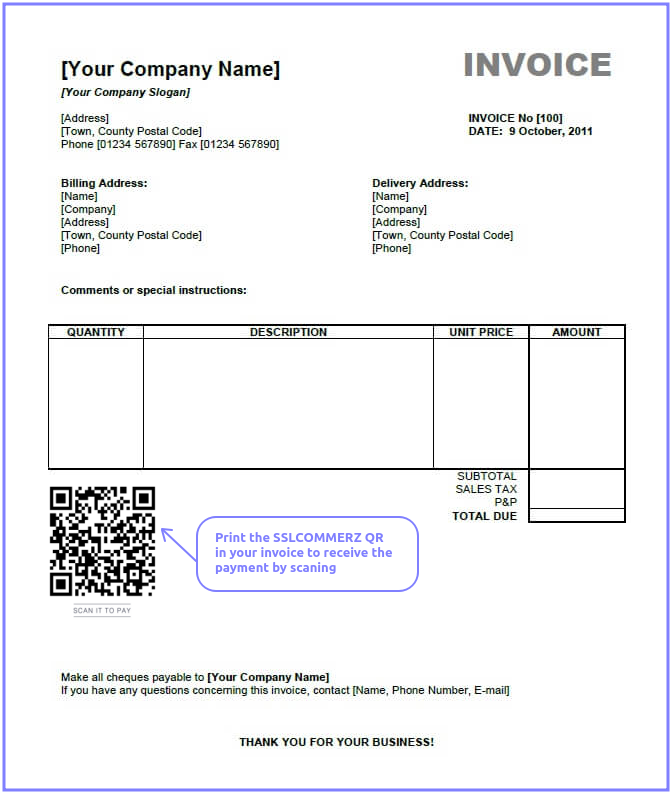
It is a easy way to collect the payment from your customer. You can print the SSLCOMMERZ QR in your invoice and at the time of delivery, customer can scan and pay the invoice amount. Also you can share Invoice Payment Link through SMS, Email or Facebook Messenger to collect the payment
Add QR in Your Invoice
You can past the SSLCOMMERZ QR in your invoice and send the Payment Link through SMS/Email
Payment Process Environment
We have both Live environment and Test/Sandbox environment in SSLCOMMERZ. You just need to use proper URL and Store ID's to process payments. We provide separate store ID for live and test
Live Environment
All the transaction made using this environment are counted as real transaction, URL starts with https://securepay.sslcommerz.com
Sandbox Environment
All the transaction made using this environment are counted as test transaction and has no effect with accounting, URL starts with https://sandbox.sslcommerz.com.
Test Credit Card Account Numbers
| Card | Number | Expiry | CVV |
|---|---|---|---|
| VISA | 4111111111111111 | 12/26 | 111 |
| Mastercard | 5111111111111111 | 12/26 | 111 |
| American Express | 371111111111111 | 12/26 | 111 |
Mobile OTP: 111111 or 123456
Create Invoice
Ready the Parameters
Some mandatory parameters need to pass to SSLCOMMERZ. It identify your customers and orders. Also you have to pass the success, fail, cancel url to redirect your customer after pay.
Sandbox / Test Environment
https://sandbox.sslcommerz.com/gwprocess/v4/invoice.php
Live Environment
https://securepay.sslcommerz.com/gwprocess/v4/invoice.php
API Request
| Parameter | Type | Required | Description |
|---|---|---|---|
| Integration Required Parameters | |||
| store_id | string (30) | mandatory | Your SSLCOMMERZ Store ID is the integration credential which can be collected through our managers |
| store_passwd | string (30) | mandatory | Your SSLCOMMERZ Store Password is the integration credential which can be collected through our managers |
| refer | string (30) | mandatory | This reference number you will get in SSLCOMMERZ panel. However for sandbox testing, you can use as "5B1F9DE4D82B6". |
| total_amount | decimal (10,2) | mandatory | The amount which will process by SSLCOMMERZ. It shall be decimal value (10,2). Example: 55.40. The transaction amount must be from 10.00 BDT to 500000.00 BDT |
| currency | string (3) | mandatory | The currency type must be mentioned. It shall be three characters. Example: BDT, USD, EUR, SGD, INR, MYR, etc. If the transaction currency is not BDT, then it will be converted to BDT based on the current convert rate. Example: 1 USD = 82.22 BDT. |
| tran_id | string (30) | mandatory | Unique transaction ID to identify your order in both your end and SSLCOMMERZ |
| acct_no | string (50) | mandatory | You can share a reference id or invoice id from your system. |
| product_category | string (50) | mandatory | Mention the product category. It is a open field. Example: clothing, shoes, watches, gift, healthcare, jewellery, top up, toys, baby care, pants, laptop, donation, etc |
| is_bangla_qr_enabled | string (3) | optional | YES/NO. If 'YES', it will generate the Bangla QR.
Bangla QR is a standardized QR (Quick Response) code-based payment system in Bangladesh, launched by the Bangladesh Bank. Note: To obtain this Bangla QR via API, please communicate with your SSLCOMMERZ Business KAM along with your production store ID. |
| is_sent_email | string (3) | optional | yes / no. If 'yes', then it will send invoice to customer's email address. |
| is_sent_sms | string (3) | optional | yes / no. If 'yes', then it will send invoice payment link through sms to customer's mobile number. But you must be registered in isms.sslwireless.com. This feature will be used in next update. |
| ipn_url | string (255) | optional | Important! Not mandatory, however better to use to avoid missing any payment notification — it is the Instant Payment Notification (IPN) URL of your website where SSLCOMMERZ will send the transaction's status (Length: 255). The data will be communicated as SSLCOMMERZ Server to your Server. So, customer session will not work. IPN is very important feature to integrate with your site(s). Some transaction could be pending or customer lost his/her session, in such cases back-end IPN plays a very important role to update your backend office. |
| Parameters to Handle EMI Transaction | |||
| emi_option | integer (1) | mandatory | This is mandatory if transaction is EMI enabled and Value must be 1/0. Here, 1 means customer will get EMI facility for this transaction |
| emi_max_inst_option | integer (2) | optional | Max instalment Option, here customer will get 3, 6, 9 instalment at gateway page |
| emi_selected_inst | integer (2) | optional | Customer has selected from your Site, so no instalment option will be displayed at gateway page |
| emi_allow_only | integer (1) | optional | Value is 1/0, if value is 1 then only EMI transaction is possible, in payment page. No Mobile banking and internet banking channel will not display. This parameter depends on emi_option and emi_selected_inst |
| Customer Information | |||
| cus_name | string (50) | mandatory | Your customer name to address the customer in payment receipt email |
| cus_email | string (50) | mandatory | Valid email address of your customer to send payment receipt from SSLCOMMERZ end |
| cus_add1 | string (50) | mandatory | Address of your customer. Not mandatory but useful if provided |
| cus_add2 | string (50) | optional | Address line 2 of your customer. Not mandatory but useful if provided |
| cus_city | string (50) | mandatory | City of your customer. Not mandatory but useful if provided |
| cus_state | string (50) | optional | State of your customer. Not mandatory but useful if provided |
| cus_postcode | string (30) | mandatory | Postcode of your customer. Not mandatory but useful if provided |
| cus_country | string (50) | mandatory | Country of your customer. Not mandatory but useful if provided |
| cus_phone | string (20) | mandatory | The phone/mobile number of your customer to contact if any issue arises |
| cus_fax | string (20) | optional | Fax number of your customer. Not mandatory but useful if provided |
| Shipment Information | |||
| shipping_method | string (50) | mandatory | Shipping method of the order. Example: YES or NO or Courier |
| num_of_item | integer (1) | mandatory | No of product will be shipped. Example: 1 or 2 or etc |
| ship_name | string (50) | conditional | Mandatory, if shipping_method is YES — Shipping Address of your order. Not mandatory but useful if provided |
| ship_add1 | string (50) | conditional | Mandatory, if shipping_method is YES — Additional Shipping Address of your order. Not mandatory but useful if provided |
| ship_add2 | string (50) | optional | Additional Shipping Address of your order. Not mandatory but useful if provided |
| ship_city | string (50) | conditional | Mandatory, if shipping_method is YES — Shipping city of your order. Not mandatory but useful if provided |
| ship_state | string (50) | optional | Shipping state of your order. Not mandatory but useful if provided |
| ship_postcode | string (50) | conditional | Mandatory, if shipping_method is YES — Shipping postcode of your order. Not mandatory but useful if provided |
| ship_country | string (50) | conditional | Mandatory, if shipping_method is YES — Shipping country of your order. Not mandatory but useful if provided |
| Product Information | |||
| product_name | string (255) | mandatory | Mention the product name briefly. Mention the product name by coma separate. Example: Computer,Speaker |
| product_category | string (100) | mandatory | Mention the product category. Example: Electronic or topup or bus ticket or air ticket |
| product_profile | string (100) | mandatory | Mention goods vertical. It is very much necessary for online transactions to avoid chargeback.
Please use the below keys:
|
| hours_till_departure | string (30) | conditional | Mandatory, if product_profile is airline-tickets — Provide the remaining time of departure of flight till at the time of purchasing the ticket. Example: 12 hrs or 36 hrs |
| flight_type | string (30) | conditional | Mandatory, if product_profile is airline-tickets — Provide the flight type. Example: Oneway or Return or Multistop |
| pnr | string (50) | conditional | Mandatory, if product_profile is airline-tickets — Provide the PNR. |
| journey_from_to | string (255) | conditional | Mandatory, if product_profile is airline-tickets — Provide the journey route. Example: DAC-CGP or DAC-CGP CGP-DAC |
| third_party_booking | string (20) | conditional | Mandatory, if product_profile is airline-tickets — No/Yes. Whether the ticket has been taken from third party booking system. |
| hotel_name | string (255) | conditional | Mandatory, if product_profile is travel-vertical — Please provide the hotel name. Example: Sheraton |
| length_of_stay | string (30) | conditional | Mandatory, if product_profile is travel-vertical — How long stay in hotel. Example: 2 days |
| check_in_time | string (30) | conditional | Mandatory, if product_profile is travel-vertical — Checking hours for the hotel room. Example: 24 hrs |
| hotel_city | string (50) | conditional | Mandatory, if product_profile is travel-vertical — Location of the hotel. Example: Dhaka |
| product_type | string (30) | conditional | Mandatory, if product_profile is telecom-vertical — For mobile or any recharge, this information is necessary. Example: Prepaid or Postpaid |
| topup_number | string (150) | conditional | Mandatory, if product_profile is telecom-vertical — Provide the mobile number which will be recharged. Example: 8801700000000 or 8801700000000,8801900000000 |
| country_topup | string (30) | conditional | Mandatory, if product_profile is telecom-vertical — Provide the country name in where the service is given. Example: Bangladesh |
| cart | json | optional | JSON data with two elements. product: Max 255 characters, quantity: Quantity in numeric value and amount: Decimal (12,2)
Example: [{"product":"DHK TO BRS AC A1","quantity":"1","amount":"200.00"},{"product":"DHK TO BRS AC A2","quantity":"1","amount":"200.00"},{"product":"DHK TO BRS AC A3","quantity":"1","amount":"200.00"},{"product":"DHK TO BRS AC A4","quantity":"2","amount":"200.00"}] |
| product_amount | decimal (10,2) | optional | Product price which will be displayed in your merchant panel and will help you to reconcile the transaction. It shall be decimal value (10,2). Example: 50.40 |
| vat | decimal (10,2) | optional | The VAT included on the product price which will be displayed in your merchant panel and will help you to reconcile the transaction. It shall be decimal value (10,2). Example: 4.00 |
| discount_amount | decimal (10,2) | optional | Discount given on the invoice which will be displayed in your merchant panel and will help you to reconcile the transaction. It shall be decimal value (10,2). Example: 2.00 |
| convenience_fee | decimal (10,2) | optional | Any convenience fee imposed on the invoice which will be displayed in your merchant panel and will help you to reconcile the transaction. It shall be decimal value (10,2). Example: 3.00 |
| Customized or Additional Parameters | |||
| value_a | string (255) | optional | Extra parameter to pass your meta data if it is needed. Not mandatory |
| value_b | string (255) | optional | Extra parameter to pass your meta data if it is needed. Not mandatory |
| value_c | string (255) | optional | Extra parameter to pass your meta data if it is needed. Not mandatory |
| value_d | string (255) | optional | Extra parameter to pass your meta data if it is needed. Not mandatory |
Sample Request
$ curl -X POST https://sandbox.sslcommerz.com/gwprocess/v4/invoice.php \
-d 'store_id=testbox&
store_passwd=qwerty&
refer=5B1F9DE4D82B6&
acct_no=CUST_REF_01&
total_amount=100&
currency=EUR&
tran_id=REF123&
cus_name=Customer Name&
cus_email=cust@yahoo.com&
cus_add1=Dhaka&
cus_add2=Dhaka&
cus_city=Dhaka&
cus_state=Dhaka&
cus_postcode=1000&
cus_country=Bangladesh&
cus_phone=01711111111&
cus_fax=01711111111&
ship_name=Customer Name&
ship_add1=Dhaka&
ship_add2=Dhaka&
ship_city=Dhaka&
ship_state=Dhaka&
ship_postcode=1000&
ship_country=Bangladesh&
shipping_method=YES&
product_name=topup&
product_category=recharge&
product_profile=telecom-vertical&
num_of_item=1&
value_a=ref001_A&
value_b=ref002_B&
value_c=ref003_C&
value_d=ref004_D'
Sample Response
{
   "status":"success",
   "error_reason":"",
   "invoice_refer":"5B1F9DE4D82B6",
   "pay_url":"https:\/\/sandbox.sslcommerz.com\/gwprocess\/v4\/pay.php?refer=TEST-INV5F4A76D33255D",
   "qr_image_url":"",
   "qr_image_pay_url":"https:\/\/merchant.sslcommerz.com\/web\/images\/generateQR.php?QR=https:\/\/sandbox.sslcommerz.com\/gwprocess\/v4\/pay.php?refer=TEST-INV5F4A76D33255D",
   "invoice_id":"TEST-INV5F4A76D33255D",
   "email_sending_status":"NO",
   "sms_sending_status":"NO",
   "bangla_qr_code":"0002010102120216402004005000003704152713770100000031531416100500052044600000000500003952040763530305054031005802BD5908EASY_APP6005DHAKA62610309S-6BBB-310715T3184D269DF8CB10125BQ202507241520216881FAD5663049D32"
}
API Response
| Parameter | Type | Description |
|---|---|---|
| status | string (10) | API connectivity status. If all the required data is provided, then it will return as success, neither it will be failed |
| error_reason | string (255) | If API connectivity is failed then it returns the reason. |
| invoice_refer | string (50) | The refer has been shared at the time of request. |
| pay_url | string (256) | This is the Invoice Payment Link which could be shared by SMS, Email, Facebook Messenger and others to collect the payment |
| qr_image_pay_url | string (255) | This is the QR of the payment link. It is a image. So you can use to display this QR in your web site. Also you can print in your customer invoice to scan and pay. |
| invoice_id | string (50) | This is a unique invoice id generated by SSLCOMMERZ Invoice System. You can use this invoice id to check the payment status. Therefore, you may store this invoice id in your system. |
| email_sending_status | string (20) | Email sending status. Example: YES / NO / FAILED / NOT_READY |
| sms_sending_status | string (20) | SMS sending status. Example: YES / NO / FAILED / NOT_READY |
| bangla_qr_code | string (500) | The content of the Bangla QR is based on this text. You will generate the QR using this content and display it to the customer to collect the payment. |
Invoice Payment Status
You can query your invoice payment status while you want. For ticketing system or product limitation, it will help you to release before recheck.
By invoice_id
You can check the status of a transaction by the invoice_id
So, Let's call the API and the example given below
Sandbox / Test Environment
https://sandbox.sslcommerz.com/validator/api/v4/
Live Environment
https://securepay.sslcommerz.com/validator/api/v4/
API Request
| Parameter | Type | Required | Description |
|---|---|---|---|
| store_id | string (30) | mandatory | Your SSLCOMMERZ Store ID is the integration credential which can be collected through our managers |
| store_passwd | string (30) | mandatory | Your SSLCOMMERZ Store Password is the integration credential which can be collected through our managers |
| refer | string (30) | mandatory | This reference number you will get in SSLCOMMERZ panel. However for sandbox testing, you can use as "5B1F9DE4D82B6". |
| invoice_id | string (50) | mandatory | This is a unique invoice id generated by SSLCOMMERZ Invoice System. You can use this invoice id to check the payment status. Therefore, you may store this invoice id in your system. |
| action | string (30) | mandatory | invoicePaymentStatus. |
Sample Request
$ curl -X POST https://sandbox.sslcommerz.com/validator/api/v4/ \
-d 'store_id=testbox&
store_passwd=qwerty&
refer=5B1F9DE4D82B6&
action=invoicePaymentStatus&
invoice_id=TEST-INV5F5E8BA9345C8&'
Sample Response
{
   "APIConnect":"DONE",
   "status":"success",
   "failedreason":"",
   "refer":"5B1F9DE4D82B6",
   "invoice_id":"",
   "payment_status":"VALID",
   "transaction":"JON Details"
}
API Response
| Parameter | Type | Description |
|---|---|---|
| APIConnect | string (30) | API Connection Status -
|
| status | string (20) | Action's Status. This parameter indicates whether the action requested by this API is success or failed.
|
| failedreason | string (256) | If API connectivity or the status is failed then it returns the reason. |
| refer | string (30) | Mandatory - This reference number you will get in SSLCOMMERZ panel. However for sandbox testing, you can use as "5B1F9DE4D82B6". |
| invoice_id | string (50) | Mandatory - This is a unique invoice id generated by SSLCOMMERZ Invoice System. You can use this invoice id to check the payment status. Therefore, you may store this invoice id in your system. |
| payment_status | string (20) | Transaction Status. This parameter needs to be checked before update your database as a successful transaction.
|
| transaction | Array | It will display the details of a successful transaction (see the transaction table below) |
transaction
| Parameter | Type | Description |
|---|---|---|
| status | string (20) | Transaction Status. This parameter needs to be checked before update your database as a successful transaction.
|
| sessionkey | string (50) | The session id has been generated at the time of transaction initiated. |
| tran_date | datetime | Transaction date - Payment completion date as 2016-05-08 15:53:49 ( PHP date('Y-m-d H:i:s') ) |
| tran_id | string (30) | Transaction ID (Unique) that was sent by you during initiation. This parameter needs to be validated with your system database for security |
| val_id | string (50) | A Validation ID against the Transaction which is provided by SSLCOMMERZ. |
| amount | decimal (10,2) | The total amount sent by you. However, it could be changed based on currency type. This parameter needs to be validated with your system database for security |
| store_amount | decimal (10,2) | The amount what you will get in your account after bank charge ( Example: 100 BDT will be your store amount of 96 BDT after 4% Bank Commission ) |
| card_type | string (50) | The Bank Gateway Name that customer selected |
| card_no | string (80) | Customer’s Card number. However, for Mobile Banking and Internet Banking, it will return customer's reference id. |
| currency | string (3) | Currency Type which will be settled with your merchant account after deducting the Gateway charges. This parameter is the currency type of the parameter amount |
| bank_tran_id | string (80) | The transaction ID at Banks End |
| card_issuer | string (50) | Issuer Bank Name |
| card_brand | string (30) | VISA, MASTER, AMEX, IB or MOBILE BANKING |
| card_issuer_country | string (50) | Country of Card Issuer Bank |
| card_issuer_country_code | string (2) | 2 digits short code of Country of Card Issuer Bank |
| currency_type | string (3) | The currency you have sent during initiation of this transaction. If the currency is different than BDT, then it will be converted to BDT by the current conversion rate. This parameter needs to be validated with your system database for security |
| currency_amount | decimal (10,2) | The currency amount you have sent during initiation of this transaction. If the amount is not mentioned in BDT, then it will be converted to BDT by the current conversion rate and return by the above field amount. This parameter needs to be validated with your system database for security |
| emi_instalment | integer (2) | Tenure of the EMI transaction which is choosen by the customer. |
| emi_amount | decimal (10,2) | EMI charge which will be paid to the Issuer Bank |
| discount_percentage | decimal (10,2) | If customer gets any discount based on the campaign is managed by both you and SSLCOMMERZ. |
| discount_remarks | string (255) | Short description of the campaign which is managed by both you and SSLCOMMERZ. |
| value_a | string (255) | Same Value will be returned as Passed during initiation |
| value_b | string (255) | Same Value will be returned as Passed during initiation |
| value_c | string (255) | Same Value will be returned as Passed during initiation |
| value_d | string (255) | Same Value will be returned as Passed during initiation |
| risk_level | integer (1) | Transaction's Risk Level - High (1) for most risky transactions and Low (0) for safe transactions. Please hold the service and proceed to collect customer verification documents |
| risk_title | string (50) | Transaction's Risk Level Decription |
Invoice Cancellation
You can cancel your invoice.
By invoice_id
So, Let's call the API and the example given below
Sandbox / Test Environment
https://sandbox.sslcommerz.com/validator/api/v4/
Live Environment
https://securepay.sslcommerz.com/validator/api/v4/
API Request
| Parameter | Type | Required | Description |
|---|---|---|---|
| store_id | string (30) | mandatory | Your SSLCOMMERZ Store ID is the integration credential which can be collected through our managers |
| store_passwd | string (30) | mandatory | Your SSLCOMMERZ Store Password is the integration credential which can be collected through our managers |
| refer | string (30) | mandatory | This reference number you will get in SSLCOMMERZ panel. However for sandbox testing, you can use as "5B1F9DE4D82B6". |
| invoice_id | string (50) | mandatory | This is a unique invoice id generated by SSLCOMMERZ Invoice System. You can use this invoice id to check the payment status. Therefore, you may store this invoice id in your system. |
| action | string (30) | mandatory | invoiceCancellation. |
Sample Request
$ curl -X POST https://sandbox.sslcommerz.com/validator/api/v4/ \
-d 'store_id=testbox&
store_passwd=qwerty&
refer=5B1F9DE4D82B6&
action=invoiceCancellation&
invoice_id=TEST-INV5F5E8BA9345C8&'
Sample Response
{
   "APIConnect":"DONE",
   "status":"success",
   "failedreason":"",
   "refer":"5B1F9DE4D82B6",
   "invoice_id":"",
   "payment_status":"CANCELLED"
}
API Response
| Parameter | Type | Description |
|---|---|---|
| APIConnect | string (30) | API Connection Status -
|
| failedreason | string (256) | If API connectivity or the status is failed then it returns the reason. |
| status | string (20) | Action's Status. This parameter indicates whether the action requested by this API is success or failed.
|
| refer | string (30) | Mandatory - This reference number you will get in SSLCOMMERZ panel. However for sandbox testing, you can use as "5B1F9DE4D82B6". |
| invoice_id | string (50) | Mandatory - This is a unique invoice id generated by SSLCOMMERZ Invoice System. You can use this invoice id to check the payment status. Therefore, you may store this invoice id in your system. |
| payment_status | string (20) | Transaction Status. This parameter needs to be checked before update your database as a successful transaction.
|